BOM and production5 min read
Bill of Materials for Small Electronics Assembly: A Practical Guide
How to structure a BOM for PCB assembly, plan for attrition and alternates, kit each production run, and turn shortages into purchase orders.
By Appikorn team ·
In this article
Short answer
What is the difference between a single-level and a multi-level BOM?
A single-level BOM lists all parts of a product in one list. A multi-level BOM nests sub-assemblies, each with its own BOM, and is needed when sub-assemblies are stocked, reused or sent out separately.
In electronics assembly the bill of materials (BOM) is the single most important document after the drawing. It decides what you buy, what the store issues, what the SMT line places and what each board costs. A BOM that lives in a spreadsheet emailed between design, purchase and stores drifts out of date quickly. This guide explains how to structure a BOM for small electronics assembly so that it works for purchase, stores and production alike.
What a good BOM line contains
Each line describes one part needed to build one unit of the product:
- Your item code (not only the manufacturer part number), so purchase and stores talk about the same thing.
- Description and manufacturer part number, for example a 10k 0603 resistor or an LM2596 regulator in a specific package.
- Quantity per unit and the unit (pieces, metres, grams).
- Reference designators (R1, R7, C12) for assembly and rework.
- Scrap or allowance percentage, where the part is lost in the process.
- Approved alternates, if any.
Keep the HSN code on the item, not on the BOM line, so purchase invoices and stock use the same value.
Single-level and multi-level BOMs
A single-level BOM lists every part of the product in one flat list. It is fine for a simple board with no sub-assemblies.
A multi-level BOM nests sub-assemblies. A controller might contain a main PCB assembly, a display PCB assembly, a wiring harness and an enclosure; each sub-assembly has its own BOM. Multi-level BOMs matter as soon as you:
- build and stock sub-assemblies ahead of final assembly,
- send one sub-assembly to a job worker but do the rest in house,
- use the same sub-assembly in several products.
Planning with a multi-level BOM means "exploding" it: multiplying the quantities down through every level, and taking off sub-assemblies you already have in stock. Before changing or retiring a part, look up where it is used across all BOMs.
Alternates and revisions
Component shortages are a fact of life in electronics. Record approved alternates on the BOM rather than in someone's memory, and decide who may approve a substitution on the floor. A substitution should be an approved change for a specific production order, not a quiet swap.
When the design changes, make a new BOM revision. A production order should freeze the revision it was released with, so a change made next week does not silently alter boards already in progress.
Attrition and allowance
SMT lines lose small parts: pick-up errors, reel splices, parts dropped during feeder changes. Hand assembly loses screws and washers. Plan for it with an allowance per part type rather than one number for everything. A typical starting point is a percentage for small passives, a few spare pieces for expensive chips and connectors, and none for the bare PCB. Tune it from what you actually see at the end of each run.
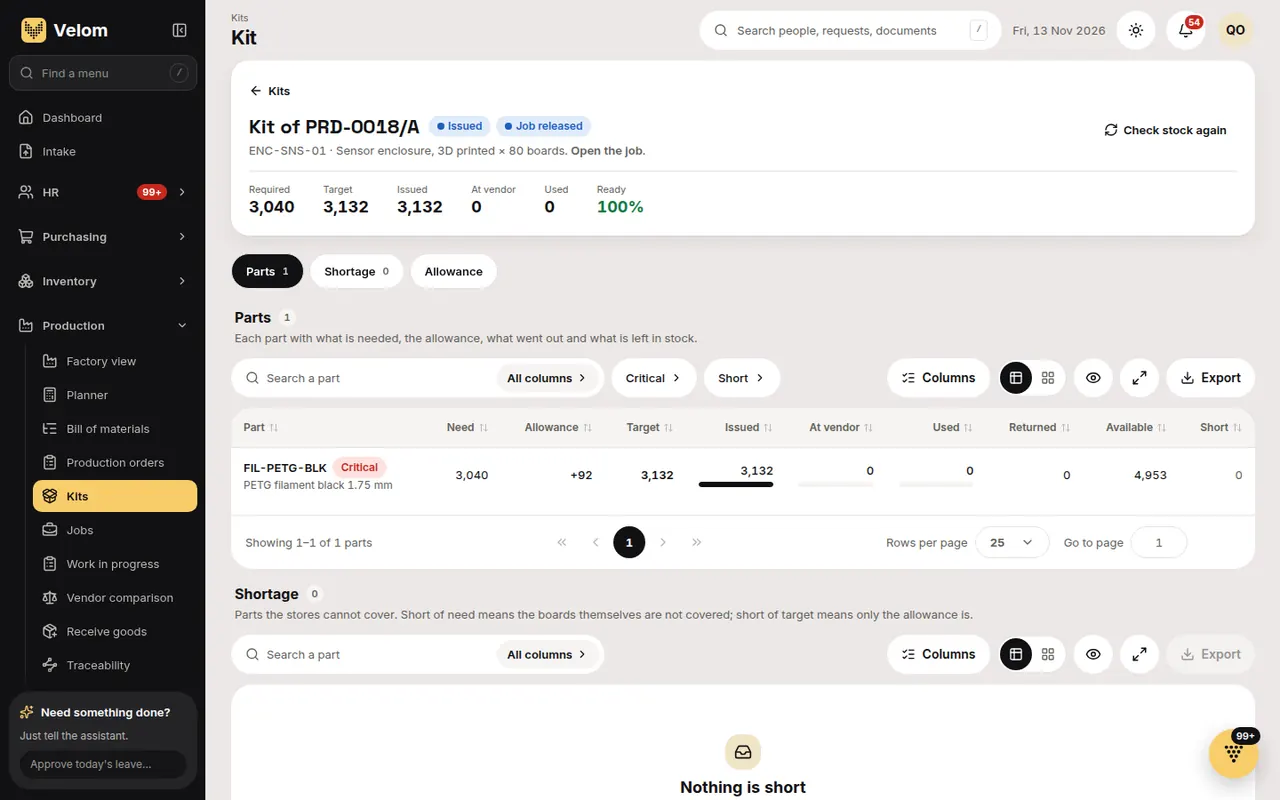
The allowance is not a loss to write off. What is not used should come back to the store or carry to the next run. Tracking that is what separates a real kit count from a guess.
Kitting per production run
A customer order for 100 boards rarely finds all 100 boards' worth of parts in stock on the same day. Rather than wait, split the order into runs: build the boards you can now, hold the rest. For each run:
- Work out the kit target: boards in the run times quantity per board, plus the allowance, rounded up to full packs where the part comes in reels or trays.
- Compare the kit target with free stock, after what earlier runs of the same order will draw.
- Mark the run ready, partly short (only the allowance is missing) or short (a critical part is missing). Treat consumables such as solder and labels as non-critical.
- Issue the kit from the store to the floor lot by lot, oldest first, so traceability is kept.
- After the run, count leftovers back and compare with what the good and rejected boards should have used.
From BOM to purchase
The BOM is also the start of material planning. For a build of a given quantity, the shortfall for each part is what you need, minus what is in stock, minus what is already on order and arriving in time. Then choose a vendor for each short part by your rule (preferred vendor, lowest price, fastest delivery) and raise draft purchase orders. Two points trip people up:
- Minimum order quantity is a minimum, not a pack size. If you need 150 and the MOQ is 100, order 150.
- Pack size rounds up. If the part only comes in reels of 5,000, the order is rounded up to whole reels.
A BOM checklist
- Every line uses your item code, with manufacturer part number in the item.
- Sub-assemblies have their own BOMs; no product contains itself.
- Allowance set by part type and reviewed after runs.
- Alternates recorded and approved.
- Revisions frozen on released production orders.
- Cost of one unit visible, with missing prices flagged.
How Velom helps
Velom's production module keeps every BOM on one screen, with the cost of one unit (going down through sub-assemblies, and flagged when a part has no price), where-used lookups, and a full-page editor with quantity and scrap percentage per line. You can also give Velom a BOM file and it reads the parts table into a proposal for a person to approve. The planner explodes the BOM through every level, takes off stock and open orders, and raises draft purchase orders by your vendor rule. Production orders freeze the BOM revision; an order can be split into runs, each with its own kit, allowance rules per part type, and readiness. Leftovers return to inventory in the same lot. More on Velom for electronics assembly.
Conclusion
A BOM that works on the shop floor is more than a parts list: it carries your item codes, alternates, allowances and revisions, and it drives kitting and purchase. Keep one version of it, shared by design, purchase, stores and production, and most of the daily surprises in electronics assembly go away.
Frequently asked questions
What is the difference between a single-level and a multi-level BOM?
A single-level BOM lists all parts of a product in one list. A multi-level BOM nests sub-assemblies, each with its own BOM, and is needed when sub-assemblies are stocked, reused or sent out separately.
How much attrition should I allow for SMT parts?
There is no single number. Start with a percentage for small passives and a few spares for expensive parts, then adjust per part type from what you actually lose in each run.
What is kitting in production?
Collecting all the parts needed for a production run, including the allowance, and issuing them from the store to the floor before the run starts.
Should the BOM change affect orders already in progress?
No. Freeze the BOM revision when a production order is released, so later changes apply only to new orders.