Attendance5 min read
How does face recognition attendance work in your factory
Discover how to move beyond unreliable punch machines and manual registers to a secure, location-aware attendance system for your factory floor.
By Appikorn team ·
In this article
Short answer
How does face recognition attendance work to prevent proxy punching?
The system uses a combination of geofencing and face detection. It verifies that the user is physically present within the factory premises using GPS data and triggers the camera to capture a photo of the person checking in, ensuring that the person punching in is actually on-site.
The problem: a realistic day in an Indian SME factory
In a typical electronics assembly unit, the day begins with a bottleneck at the gate. Workers crowd around a single, aging biometric punch machine that often fails to read fingerprints, especially after a morning of handling solder paste or cleaning agents. The supervisor stands by, watching the clock, while frustration builds. Someone inevitably claims their thumbprint is not registering, leading to a manual entry in a tattered notebook. This is the start of a daily struggle that repeats at every shift change.
By the end of the week, the store keeper and HR staff face a mountain of paperwork. They must reconcile these manual notes with the machine's digital logs. Arguments break out over who arrived at 8:00 AM versus 8:15 AM. Because the system is disconnected from the actual production floor, there is no way to verify if a person was truly present or if someone else punched them in. This lack of transparency creates distrust between the management and the workforce, turning a simple task into a source of constant friction.
What it costs: time, rework, money and risk
The hidden costs of a faulty attendance system are significant. When a machine breaks or fails to read a print, the immediate cost is time lost on the production line. Workers who should be at their assembly stations are instead waiting in line or arguing with the supervisor. This ripple effect delays the entire production schedule, potentially missing shipment deadlines for critical components. For a small manufacturer, every hour of idle time directly impacts the bottom line.
Beyond the lost hours, there is the risk of inaccurate payroll. If the attendance data is flawed, the resulting salary calculations will be incorrect. This leads to time-consuming rework for the payroll team, who must manually adjust records and explain deductions to employees. Furthermore, the risk of proxy punching—where one worker punches in for another—is a persistent threat to productivity and safety. If you cannot rely on your attendance data, you cannot manage labour costs effectively. Ensuring compliance with statutory requirements like the Employees' Provident Fund and Miscellaneous Provisions Act becomes much harder when your source data is unreliable.
How the team did it before: paper, spreadsheets, WhatsApp
Before adopting a digital system, most factories rely on a combination of legacy methods. Attendance starts with a paper register kept at the security cabin. When the machine inevitably fails, the security guard writes down the name and time. Later, the HR assistant takes this register and types the data into a spreadsheet. This process is prone to human error, from misreading handwriting to simple typos during data entry.
Communication often moves to WhatsApp. A worker who is late or needs an early exit messages their supervisor, who might forget to pass that information to HR. By the time the end-of-month payroll run happens, the HR team is scrambling to piece together a puzzle of scattered messages, paper slips, and spreadsheet tabs. This fragmented approach lacks a central source of truth. It makes it impossible to see who is on the floor in real-time, leaving managers blind to the actual status of their workforce during critical production hours.
How Velom solves it, step by step
Velom replaces the unreliable punch machine with a mobile-first approach that combines location verification with face detection. The system ensures that attendance is recorded only when the person is physically at the site, preventing proxy punches and providing a clear, audit-ready record for payroll. You can explore these capabilities further on the face attendance page.
- The Owner or HR sets up the factory location and shift timings in the Velom web app.
- Each worker installs the Velom Android app on their phone.
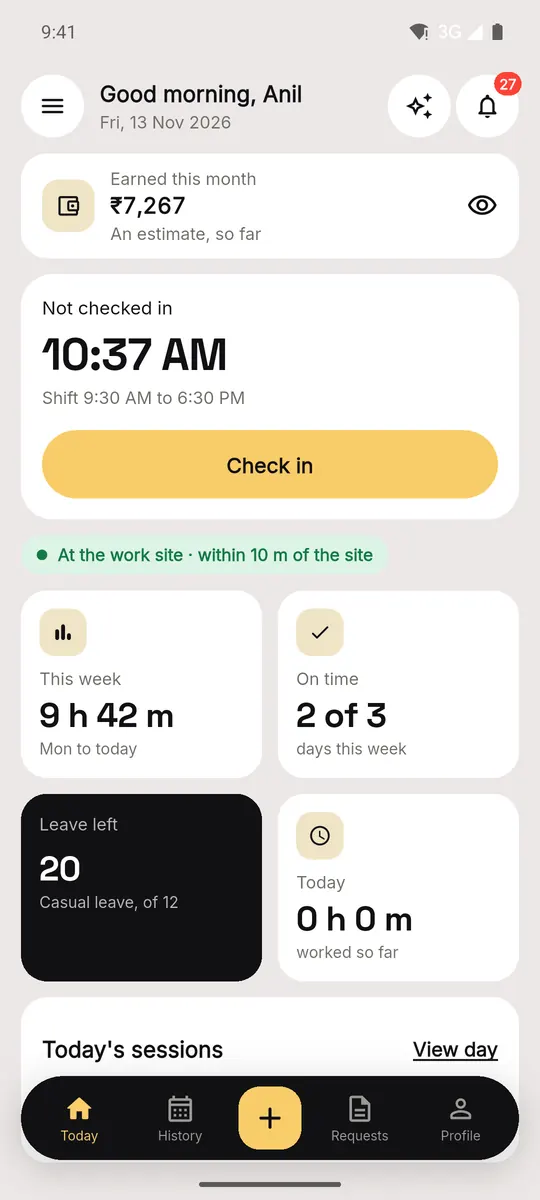
- At the start of the shift, the worker taps the check-in button within the designated geofence area.
- If enabled, the app automatically triggers the camera to take a photo, confirming a face is present in the frame.
- The server records the exact time and location, flagging any punches that occur outside the geofence or show signs of location spoofing.
- If a worker forgets to punch out, the day remains as 'Needs review' until the supervisor approves the actual time, ensuring no guesswork is used in payroll.
- All approved attendance data flows directly into the payroll module, eliminating the need for manual spreadsheet calculations.
Example scenario
This is an illustrative example, not a real customer. Consider a small electronics assembly unit with 50 workers. On Monday morning, the team begins their work. At 8:55 AM, a worker walks toward the assembly line and taps 'Check-in' on their phone. The system verifies their GPS location against the factory geofence and captures a clear photo of the worker. The record is created instantly.
By Wednesday, a worker tries to punch in from home, but the system flags the attempt because the location is outside the defined factory boundary. The supervisor receives a notification and rejects the request. On Friday, a worker forgets to check out at 5:00 PM. The system marks the day as 'Needs review' instead of assuming a time. The supervisor reviews the actual log, confirms the worker left at 5:15 PM, and updates the record. At the end of the month, the payroll run takes these verified hours directly, producing an accurate bank advice file without any manual reconciliation or arguments over late marks.
What to check before you start
Before implementing a mobile-based attendance system, ensure your infrastructure is ready. First, define your work locations clearly in the system so the geofencing works accurately. Second, update your employee list and assign the correct shifts to every person. Third, communicate the change to your team; explain that the app is for their benefit to ensure accurate pay and fair treatment. Finally, ensure your HR staff is trained on how to review 'Needs review' statuses, as this is the key to maintaining data integrity. Always verify your internal policies against the latest government notifications regarding labour laws to ensure your documentation remains compliant.
By choosing a system that focuses on verification rather than just recording, you remove the guesswork from your factory management. When every punch is tied to a location and a person, you stop losing money on ghost hours and start building a culture of trust. This shift allows your managers to focus on production and quality, rather than spending their time acting as human calculators for payroll.
Frequently asked questions
How does face recognition attendance work to prevent proxy punching?
The system uses a combination of geofencing and face detection. It verifies that the user is physically present within the factory premises using GPS data and triggers the camera to capture a photo of the person checking in, ensuring that the person punching in is actually on-site.
Does the system identify the person using their face?
No, the system does not perform face identification or store biometric face templates. It uses face detection to confirm that a human face is present in the frame at the time of the punch, which helps prevent accidental or fraudulent entries.
What happens if a worker forgets to punch out?
The system does not guess the time. It marks the day as 'Needs review' in the attendance register. The supervisor or HR must then enter the correct time and approve it before the data can be used for payroll calculations.
Can workers punch in from home?
No, the system uses geofencing to restrict check-ins to your specific factory location. If a worker attempts to punch in from outside the designated area, the system flags the entry, and it will not be counted as a valid work session.