
Attendance5 min read
How does face recognition attendance work in your factory
Discover how to move beyond unreliable punch machines and manual registers to a secure, location-aware attendance system for your factory floor.
24 November 2026
Attendance and face check-in
People check in and out with one tap. The server records the time and the work-site location, and the camera takes a photo as soon as it sees one clear face. Managers see who is in, what looks doubtful and what needs approval.
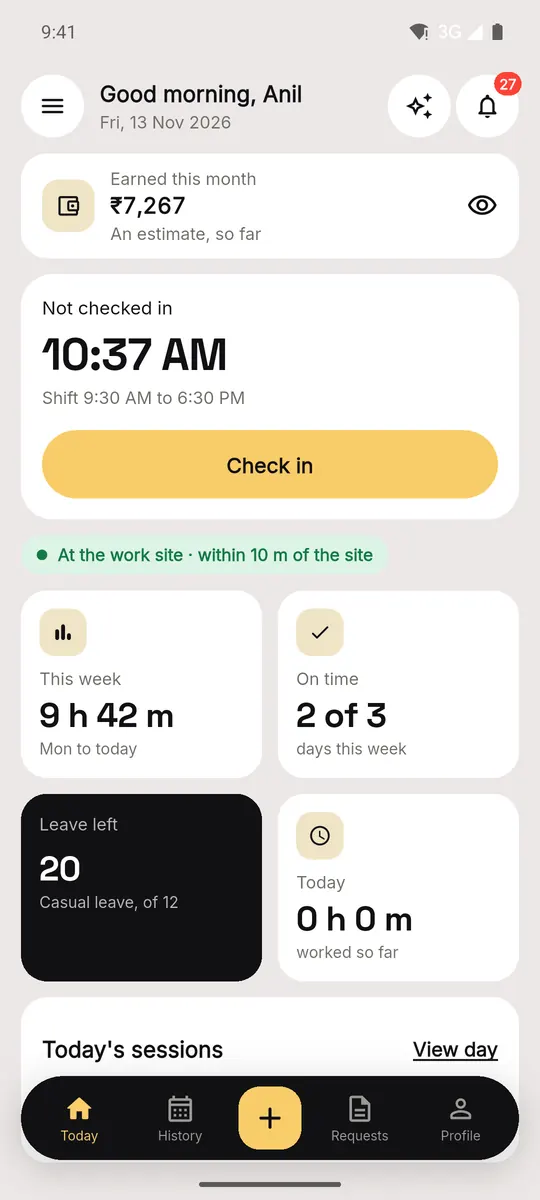
A worker taps Check in on the Velom Android app. The phone checks the work-site location and takes a photo once it detects one clear face. Velom does not identify people from faces and keeps no face template. HR and managers see the register, late marks and requests in real time.
Velom app by Appikorn · Updated
Add work locations, shifts, holidays and leave types once.
One tap. Location is checked and, if required, the face photo is taken automatically.
Managers see doubtful punches, missing check-outs and requests in one place.
The register is settled and goes straight into the payroll run.
The Today screen has one button. The phone never decides whether it is a check-in or a check-out: the server looks for an open session and either opens one or closes it, and stamps its own time. A phone with a wrong clock cannot change the record.
Shifts, holidays, weekly offs and work locations are set by the company, so every day is judged against the right timings.
Every punch carries the phone's location, its accuracy and whether the phone reports a fake location. The server measures the distance to the person's work site. A doubtful punch is still recorded, unless the Owner chose to refuse it, and it gets a flag for the manager to review.
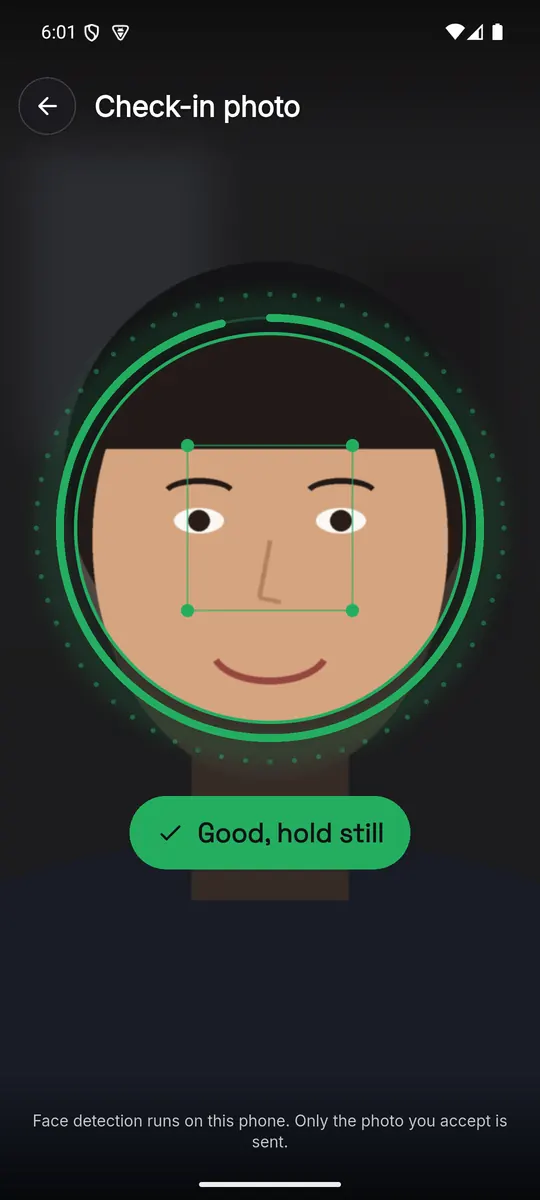
When the company requires a photo, the camera opens with a round face frame and takes the picture by itself as soon as exactly one clear face is in view. Short prompts help: move closer, find more light, look straight at the camera.
The face is detected on the phone. Velom checks that a face is present, not whose face it is: no face template is stored and nothing is compared with the profile photo. The photo is kept privately with the punch, so a manager can look at it when a punch is flagged.
When someone forgets to check out, Velom does not guess. The day waits as Needs review until the real time is given and approved. A working day with no check-in and no leave turns into Absent after the shift, and the person and the manager are told.
If the Owner switches it on, Velom can record such a day as leave by itself, and anyone concerned can undo it.
Five kinds of request share one approval flow: leave, permission for a short absence, overtime, work from home and attendance correction. Leave balances go down on approval and come back on cancellation, and a calendar shows who is away.
No. Velom detects that a clear face is in front of the camera and takes the photo. It does not identify the person from the face, and no face template is stored.
No. People check in with the Velom Android app on their phone. Velom does not sell or connect to fingerprint or face terminals.
Every punch carries the location. The server compares it with the work site and flags a punch that is too far away or comes from a phone reporting a fake location.
The day is marked Needs review. The person or HR gives the real time, a manager approves it, and only then does it count.
Yes. Leave, permission, overtime, work from home and attendance corrections are requests in the app, with approvals and balances.
Attendance5 min read
Discover how to move beyond unreliable punch machines and manual registers to a secure, location-aware attendance system for your factory floor.
24 November 2026
Leave6 min read
Verbal leave approvals and WhatsApp messages often vanish before payday. A structured leave approval workflow ensures every day off is accounted for.
24 November 2026

Attendance6 min read
Managing attendance for shop floor workers often leads to disputes over missed punches. Learn how to standardize the process for smoother payroll operations.
21 November 2026
Get the Android app on Google Play, or sign in on the web if your company already uses Velom.