
Quality6 min read
Incoming Quality Inspection: Managing Factory Standards Effectively
A robust incoming quality inspection process prevents defective parts from reaching your production line, saving time and reducing costly rework.
19 November 2026
Quality and inspections
Velom turns your QC checklist into an inspection plan per product. Inspectors fill it piece by piece for incoming goods and finished units, and anything out of limit is flagged for a decision.
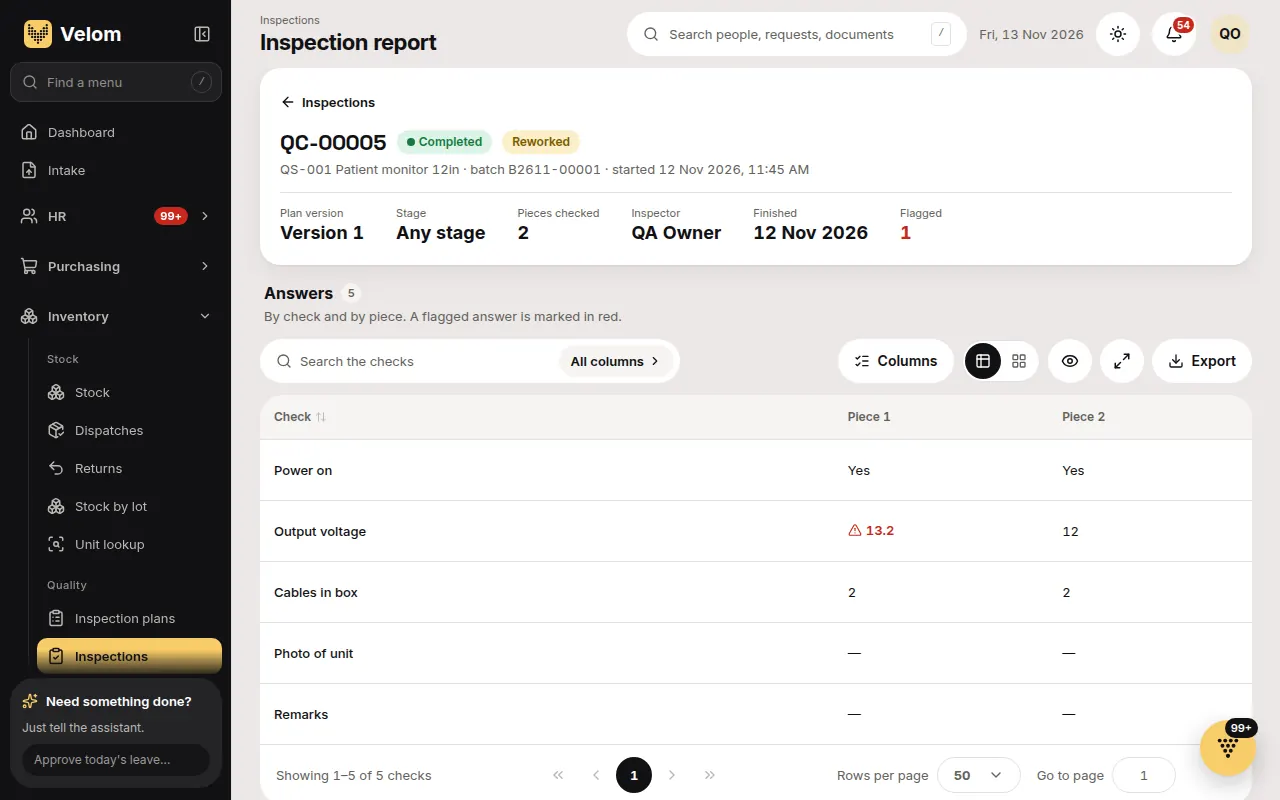
Velom keeps inspection checklists per product, with versions. Incoming goods and finished units are checked piece by piece, and out-of-limit answers are flagged. Receiving records rejected quantities with reasons, returns get an RMA record with fault and decision, and traceability links each unit to its part lots and vendors.
Velom app by Appikorn · Updated
Turn your QC checklist into an inspection plan for the product.
Fill it for incoming goods or finished units, piece by piece.
Accept, rework or reject; flagged readings stand out.
Handle rejections, acceptance and returns with full traceability.
An inspection plan is the checklist for one product: yes or no checks, readings with limits, counts, photos and remarks. Plans have versions, so a report always shows which version it was filled against.
An inspection records the stage, the batch, the inspector and each piece checked. A reading outside its limit is marked in red and counted as flagged, and the result (passed, reworked or rejected) stays with the batch.
At receiving, the store records how many came in, how many were rejected and why. Rejected goods are kept apart from good stock, and the right people are told, so a debit note or a replacement can follow.
After delivery, the customer has a number of days to accept or reject. Silence is never taken as acceptance: the delivery stays open and keeps reminding until a person enters the customer's answer.
A unit that comes back gets a return record with the fault, the inspection, the likely cause, the decision and the cost.
A good inspection plan is short and specific. Put the checks in the order the inspector handles the part. Use a reading with limits wherever a number is measured, such as a voltage or a dimension, so the result is judged the same way by every inspector. Keep yes or no checks for things that really are yes or no, such as power on or label present.
Add a photo check where a picture settles arguments later, for example the packed unit. When the product or the customer's requirement changes, make a new version of the plan; older reports keep the version they were filled against.
Yes. Each check on your sheet becomes a line in the inspection plan, with limits where a reading applies.
Yes. Plans are used for incoming goods and for finished units.
No. Velom keeps your inspection records and reports; it does not certify products.
Yes. Traceability follows a board back to the part lots and vendors it was built from.
Yes. A check can ask for a photo, for example of the packed unit, alongside readings, counts and yes or no answers.
Nothing is assumed. The delivery stays open in its acceptance period and keeps reminding until a person enters the customer's answer, accepted or rejected.
Quality6 min read
A robust incoming quality inspection process prevents defective parts from reaching your production line, saving time and reducing costly rework.
19 November 2026
Quality5 min read
A formal incoming quality inspection procedure helps Indian manufacturers catch defects early, preventing faulty materials from disrupting production lines.
13 November 2026
Get the Android app on Google Play, or sign in on the web if your company already uses Velom.