Skip to content

Production, BOM and job work

From bill of materials to finished boards, including the work done outside

Velom keeps every product's parts list and route, shows what is short before you start, splits an order into jobs with their own kits, and follows parts that go to a job work vendor until they come back.

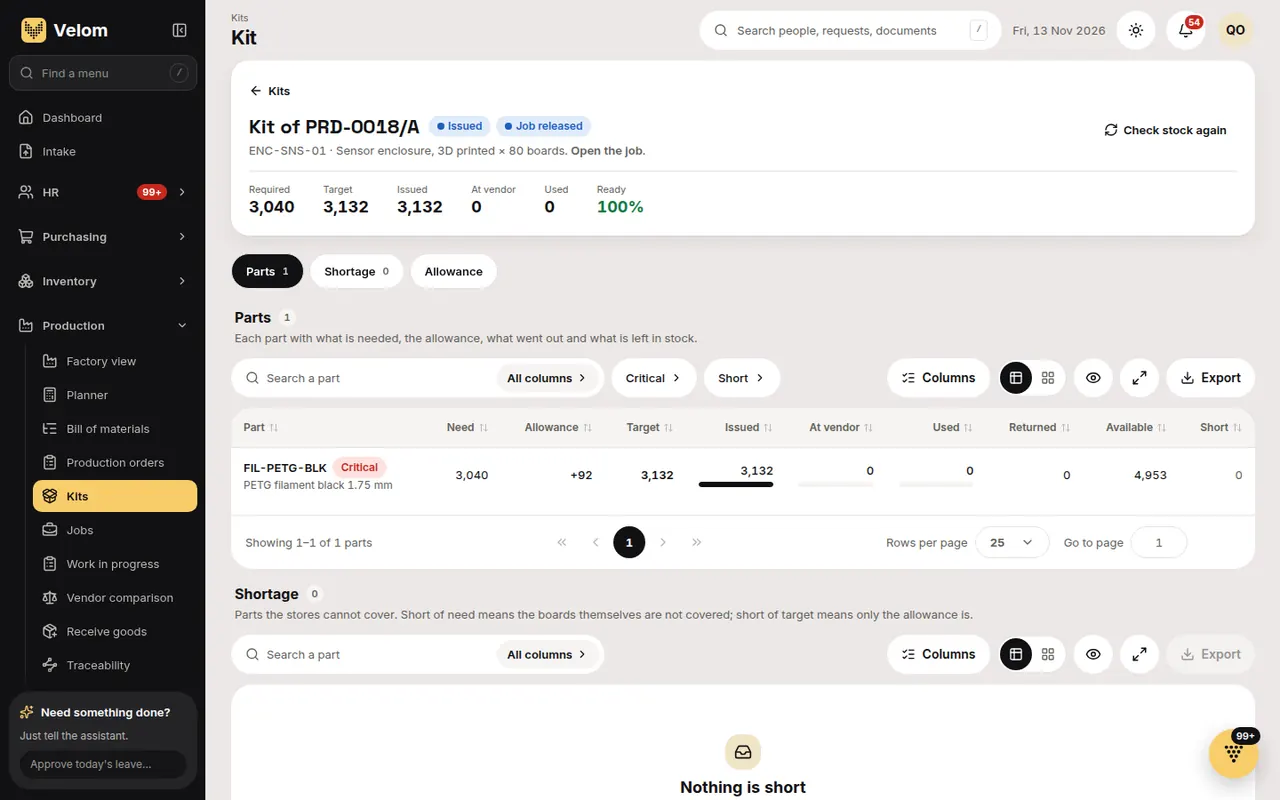
Velom kit page for a test production job showing required, issued and available quantities and readiness

How does Velom handle BOMs, production and job work?

Velom turns a bill of materials into production orders and jobs. Each job gets a kit of parts with an allowance, issued from stores or sent to a job work vendor on a challan. Parts at the vendor stay in your stock until returned, with a tally per job and ITC-04 working data.

Velom app by Appikorn · Updated

How it works

  1. 1

    Build the BOM

    Enter it, or let Intake read a parts list file into SKUs and a BOM.

  2. 2

    Plan

    See what is short for the quantity and order the missing parts.

  3. 3

    Release jobs

    Split the order into jobs, issue each kit from the store.

  4. 4

    Make in house or at a vendor

    Track stages on the floor, or send the kit on a challan and receive boards and leftovers back.

BOMs and routes

A bill of materials lists the parts in one unit of each product, with what it costs, where a part is used and when it last changed. BOMs can have several levels. Each product also has a route: the steps to make it, done in stages such as PCB assembly, testing and packing.

The planner: what to buy for a build

Pick a product and a quantity. Velom multiplies the parts list through every level, takes off what is in stock and already on order, and shows what is short. Shortages go straight to purchasing as draft purchase orders.

Orders split into jobs, each with its own kit

An order for 100 boards rarely finds all its parts at once. Velom splits it into runs, also called jobs: for example 80 boards that start now and 20 that wait. Runs always add up to the order.

Each job has a kit: the parts required plus an allowance per part, what was issued, what is at a vendor, what was used and what came back, with readiness and shortages on one page.

Job work at a vendor, followed to the last part

A step such as assembly can be done by a job work vendor. You send the kit on a job work challan. The parts stay yours and are held at that vendor. Boards come back in parts, leftover parts come home, and a tally shows any difference per part.

  • Open challans are listed with the days left to return.
  • A warning shows inputs held at a vendor longer than your set number of months.
  • ITC-04 working data, goods sent to and received from job workers, downloads as a file for your accountant.

See the floor and trace any board

The factory view shows one zone per stage and one marker per order, so you see where every job is and what it waits for. Work in progress shows where work piles up. Traceability follows a board back to the part lots and vendors it was built from, or a lot forward to every board it went into.

Questions people ask

Does Velom support multi-level BOMs?

Yes. The planner multiplies the parts list through every level for the quantity you choose.

Can we track material sent to a job worker?

Yes. Parts sent on a job work challan stay in your stock, held at that vendor, until boards and leftover parts come back and the tally is closed.

Does Velom file ITC-04?

No. Velom gives the ITC-04 working data as a file. Filing is done on the GST portal; confirm the rules with your accountant.

Can one order be built in parts?

Yes. An order can be split into jobs, each with its own kit, timing and place.

Does Velom generate e-way bills for challans?

No. The e-way bill number is typed onto the challan by hand.

Try production, bom and job work in Velom

Get the Android app on Google Play, or sign in on the web if your company already uses Velom.

Velom for Android

Get it on Google Play

Open