Tax invoices from dispatches and orders
A four-step page turns a dispatch or an order into a tax invoice: lines, tax and terms, then review. The GST split follows the place of supply, IGST or CGST and SGST, and HSN codes come from the items. Save a draft or issue the invoice, then print it or download the PDF.
E-way bill and e-invoice numbers are typed in by hand. Velom does not connect to the government portal.
Vendor bills checked before payment
A vendor bill is matched line by line: three-way against the purchase order and goods received, or two-way against goods received when there is no PO. A bill read from an invoice in Intake arrives with its lines, HSN codes and tax type already filled.
Credit and debit notes that point at their source
A credit note to a customer for rejected or returned goods, or a debit note to a vendor for a claim, always points at the invoice or bill it corrects. Notes are never deleted, because they are tax papers: an unapplied note is cancelled with a reason.
Payments, receivables and payables
Record money received and paid, and which invoices or bills each payment settled. TDS and other deductions can be entered on a receipt. Receivables and payables are grouped by age, with overdue lists and statements, and reminder text to copy into your own mail.
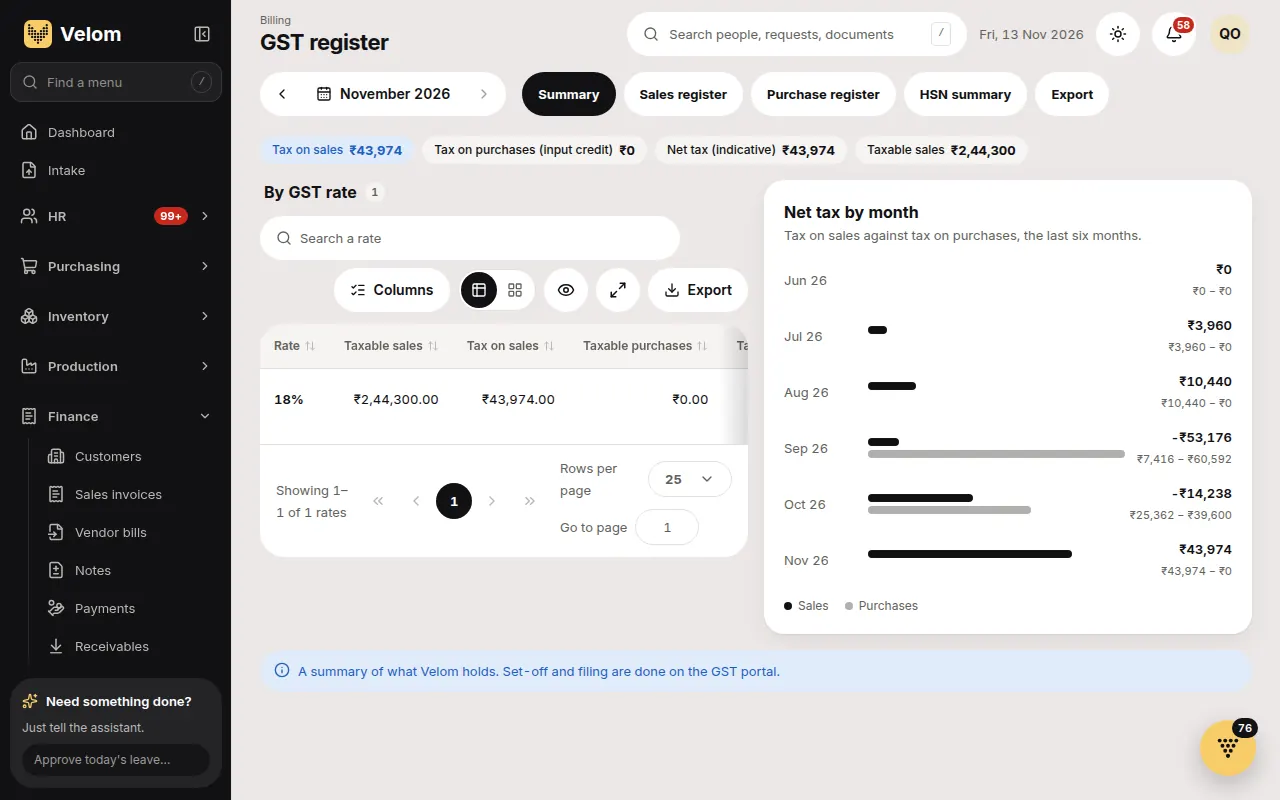
The GST register
The register shows the sales and purchase registers by month, the HSN summary, and tax on sales against tax on purchases, with export. It is a summary of what Velom holds: set-off and filing are done on the GST portal, by you or your accountant.
Before the accountant's monthly visit
Most small manufacturers hand their GST work to an accountant. Velom helps you give them clean data. Before the month closes, check that every dispatch has an invoice and every received consignment has a matched bill. Look at the purchase register for bills still waiting for a decision, and at notes that are not yet applied.
Then export the sales register, the purchase register and the HSN summary for the month. Because invoices start from dispatches and bills are matched to receipts, the registers agree with the stock records, which saves a round of questions.
- Billing settings hold the company GSTIN, numbering patterns, terms and match tolerances.
- Customers carry their GSTIN, billing and shipping addresses and credit terms.
Questions people ask
Does Velom generate e-way bills or e-invoices?
No. Velom does not connect to the government portals. You generate them on the portal and type the numbers into Velom.
Does Velom file GST returns?
No. The GST register gives the sales, purchase and HSN data; filing is done on the GST portal.
Does it handle IGST and CGST/SGST?
Yes. The tax split follows the place of supply on the invoice.
Is Velom a full accounting package?
No. It covers invoices, bills, notes, payments, receivables, payables and the GST register, not a full ledger or balance sheet.