Document AI6 min read
AI Document Processing for Small Business: Invoices and Challans
Manual invoice entry is a bottleneck for Indian SMEs. AI document processing for small business helps automate data capture and reduce costly errors.
By Appikorn team ·
In this article
Short answer
How does AI document processing for small business help reduce invoice entry errors?
AI document processing for small business automates the extraction of data from invoices, eliminating manual typing. It cross-references extracted information with your purchase orders and flags discrepancies like incorrect GST numbers, mismatched quantities, or calculation errors, allowing a human to verify the data before any records are created.
The problem: a realistic day in an Indian SME factory
In a typical electronics assembly unit, the day starts with the arrival of raw materials and ends with a mountain of paperwork. The store keeper receives components like resistors, capacitors, and PCBs throughout the day. Each delivery comes with a vendor invoice, a delivery challan, and sometimes a packing list. By evening, the store keeper is exhausted, sitting at a desk with a stack of papers, trying to manually key every detail into a computer or a spreadsheet. The pressure to finish quickly often leads to tired eyes missing a digit in a GST number or misreading a unit price.
This manual process is not just about typing; it is about reconciling what was ordered against what was billed. The purchase manager often finds that the quantity billed does not match the quantity received, or worse, the HSN codes are missing, making the records non-compliant with GST requirements. When these errors are caught weeks later, the team must spend hours digging through physical files, calling vendors, and correcting entries in the accounting system. It is a cycle of reactive work that keeps the factory from focusing on actual production and quality control.
What it costs: time, rework, money and risk
The cost of manual data entry extends far beyond the salary of the person typing the numbers. Every minute spent correcting a typo is a minute taken away from managing inventory or overseeing production quality. When a vendor invoice has a wrong rate, it creates a discrepancy in the accounts payable ledger. This leads to payment delays, which can damage relationships with reliable suppliers. If the GST number or HSN code is incorrect, the company faces risks during tax audits or when trying to claim input tax credit, potentially leading to financial penalties.
Furthermore, there is the hidden cost of lost information. When data is trapped in physical paper or scattered across isolated spreadsheets, the factory owner loses visibility into real-time costs. You cannot easily see if a vendor has increased their prices for a specific SKU over the last three months if the data is buried in a folder. This lack of transparency means you might be overpaying for parts without realizing it. The risk of fraud or accidental double-payment also increases when there is no systematic way to match invoices against purchase orders and receipts.
How the team did it before: paper, spreadsheets, WhatsApp
Before adopting modern tools, the standard operating procedure involved a mix of physical and digital chaos. The store keeper would maintain a physical inward register, writing down every item received. Simultaneously, the purchase manager would maintain a master spreadsheet to track open purchase orders. If a vendor sent an invoice via email, it was printed and filed. If they sent it via WhatsApp, it was downloaded, saved in a cluttered folder, and often forgotten.
Communication was equally fragmented. If a line item on an invoice did not match the purchase order, the purchase manager would send a message on WhatsApp to the vendor. The response would eventually arrive, but there was no central log of the conversation or the resolution. The team relied heavily on memory and informal check-ins to ensure that goods were actually received before approving a bill for payment. This reliance on human memory and manual tracking meant that if a key person was away or if a document was misplaced, the entire workflow would grind to a halt.
How Velom solves it, step by step
Velom changes this by using document intelligence to turn static documents into actionable data. Instead of typing, the team simply feeds the documents into the system. The AI reads the content, identifies the document type, and prepares it for approval. Here is how the process works:
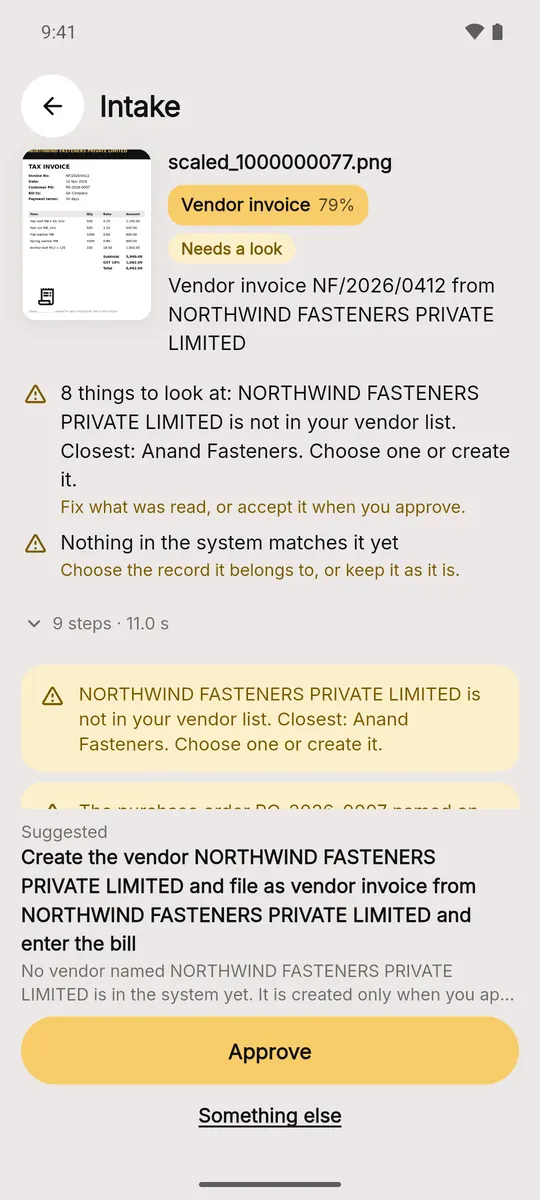
- Document Intake: The store keeper drops the vendor invoice file into Velom or scans it using the Android app. The system immediately processes the file.
- AI Reading: Velom reads the document, identifying key fields like the vendor name, invoice number, line items, and GST details. It flags any missing information or discrepancies.
- Live Review: The user views the document side-by-side with the extracted data. Every step is numbered, showing exactly what the AI has found.
- Validation: The system checks for errors, such as total amounts that do not add up or GST rates that do not fit. It highlights these for a person to review and fix.
- Approval: Once the data is verified, a single button click approves the document. Velom then creates the necessary records, such as vendor bills or stock entries, based on the approved data.
- Learning: The system learns from corrections. If a vendor code is mapped to a specific internal SKU once, Velom remembers this for future invoices, making subsequent entries even faster.
Example scenario
This is an illustrative example, not a real customer. Consider a small electronics assembly unit receiving 10 vendor invoices daily. Before using Velom, the store keeper spent roughly two hours every evening manually typing invoice data into a spreadsheet. This task often resulted in at least two errors per day, such as incorrect HSN codes or mismatched quantities, which the purchase manager had to fix the next morning. This cycle consumed approximately 15 hours of staff time per week.
After implementing Velom, the store keeper spends 15 minutes a day dropping files into the system and quickly reviewing the AI-proposed entries. The system automatically cross-references the invoice with the existing purchase order and flags any discrepancies immediately. The purchase manager now only reviews the flagged items, which are rare. Total time spent on invoice processing drops to under two hours per week. Because the data is validated at the point of entry, the team avoids the downstream rework, and the GST register remains accurate and ready for the accountant at the end of the month.
What to check before you start
Before moving to an automated system, ensure your internal processes are ready. First, maintain a clean list of vendors and SKUs. If your master data is outdated, the AI will struggle to match invoices to the correct records. Second, define your inventory locations and units of measure clearly. Consistency here is vital for the system to accurately track stock movements.
Third, ensure your team understands the difference between automated data capture and human oversight. The system is designed to assist, not to replace the need for a final check. Always verify that the vendor's GST number is valid and matches your records. Finally, consult with your accountant regarding your specific tax filing requirements, as statutory rules can change; always check the latest notification from the government. By preparing your data and your team, you ensure that the transition to automated document processing is smooth and delivers immediate value to your production workflow.
How Velom helps: By centralizing document management, Velom allows your team to move from manual data entry to exception management. Instead of spending hours typing, your staff spends minutes reviewing. This reduces the risk of human error, improves compliance, and gives you back the time needed to grow your business. You can also integrate these insights with production planning to ensure that the parts you receive are immediately ready for the assembly line.
Frequently asked questions
How does AI document processing for small business help reduce invoice entry errors?
AI document processing for small business automates the extraction of data from invoices, eliminating manual typing. It cross-references extracted information with your purchase orders and flags discrepancies like incorrect GST numbers, mismatched quantities, or calculation errors, allowing a human to verify the data before any records are created.
Does Velom automatically file my GST returns?
No, Velom does not file GST returns or connect to government portals. It assists you by organizing your sales and purchase registers and HSN summaries, which you can then use to file your returns on the official GST portal.
What happens if the AI is unsure about a reading on an invoice?
If the AI is unsure about a value or document detail, it marks the item for a person to check. Nothing is created in your system until a user manually approves the data, ensuring accuracy and control over your records.
Can I use Velom on my iPhone?
Velom is available as an Android app and a web app. On an iPhone, you can access the full functionality of the system by using the web app in your mobile browser.