Document AI6 min read
Reading GST Invoices Automatically: GSTIN, HSN and Line Items
Learn how to eliminate manual data entry errors and speed up your purchase invoice processing using AI-powered document intelligence.
By Appikorn team ·
In this article
Short answer
How does Velom handle GST invoice OCR?
Velom uses AI to read vendor invoices uploaded via the Android app or web interface. It extracts data like GSTIN, invoice numbers, and line items, presenting them for your review. It flags errors like incorrect totals or missing POs, and only creates records in your system once you manually approve the data.
The problem: a realistic day in an Indian SME factory
In many Indian manufacturing units, the day ends not when the machines stop, but when the store keeper sits down with a pile of paper. Vendor invoices arrive throughout the day, crumpled, stapled, or folded inside delivery boxes. By evening, the store keeper, often exhausted, must transcribe these documents into a computer. This is a high-pressure task where a single typo in a GST number or a misplaced decimal point in a rate can cause significant financial discrepancies.
The store keeper faces a constant stream of interruptions. A worker asks for a spare part, a truck driver needs a gate pass, and the production manager is checking on raw material status. Amidst this, the store keeper tries to match the invoice quantity against the physical goods received. If the vendor has sent a bill with a different SKU name than what is in the internal system, the store keeper must manually map the two. The pressure to finish quickly often leads to errors that only surface weeks later during an audit or when the accountant tries to reconcile the GST returns.
What it costs: time, rework, money and risk
Manual entry is not just a time-sink; it creates hidden costs that drain a factory's efficiency. When a clerk mistypes a tax rate or misses a line item, the error often remains hidden until the month-end reconciliation. Correcting these entries requires searching through physical files, contacting the vendor for a corrected invoice, and updating the ledger. This rework consumes hours that could have been spent on managing inventory or improving production flow.
Financial risk is another major concern. If a vendor's GSTIN is entered incorrectly, the input tax credit may be denied or delayed, affecting the cash flow of the business. Furthermore, if the system does not flag duplicate invoices, a company might accidentally pay the same bill twice. These inefficiencies compound over time, leading to a loss of visibility into actual purchase costs. When the purchase data is unreliable, the production manager cannot make informed decisions about raw material procurement, leading to overstocking or, worse, production stoppages due to missing components.
How the team did it before: paper, spreadsheets, WhatsApp
Before moving to digital systems, most factory teams rely on a combination of physical folders and fragmented digital tools. The process usually starts with a paper invoice being filed in a binder. The purchase manager might receive a photo of an invoice via WhatsApp, which is then printed and handed over to the store keeper. The store keeper then opens a spreadsheet to manually type in the vendor name, invoice date, quantity, rate, and tax values.
This method is prone to version control issues. Different people often maintain different versions of the same spreadsheet, leading to conflicting data. If a question arises about a specific invoice, the team must physically hunt for the paper copy, which might be buried in a drawer or sitting on a desk in another department. There is no central tracking of whether an invoice has been approved, paid, or even received. This reliance on manual, disconnected methods makes it impossible to maintain an accurate audit trail or ensure that every purchase aligns with a valid purchase order.
How Velom solves it, step by step
Velom uses document intelligence to turn raw invoices into structured data without the need for manual typing. The system acts as a digital assistant that reads, verifies, and flags potential issues before any record is created. It ensures that data entry is consistent and that every document is accounted for.
- Document intake: Drop the invoice file, paste it, or scan it directly from the Android app.
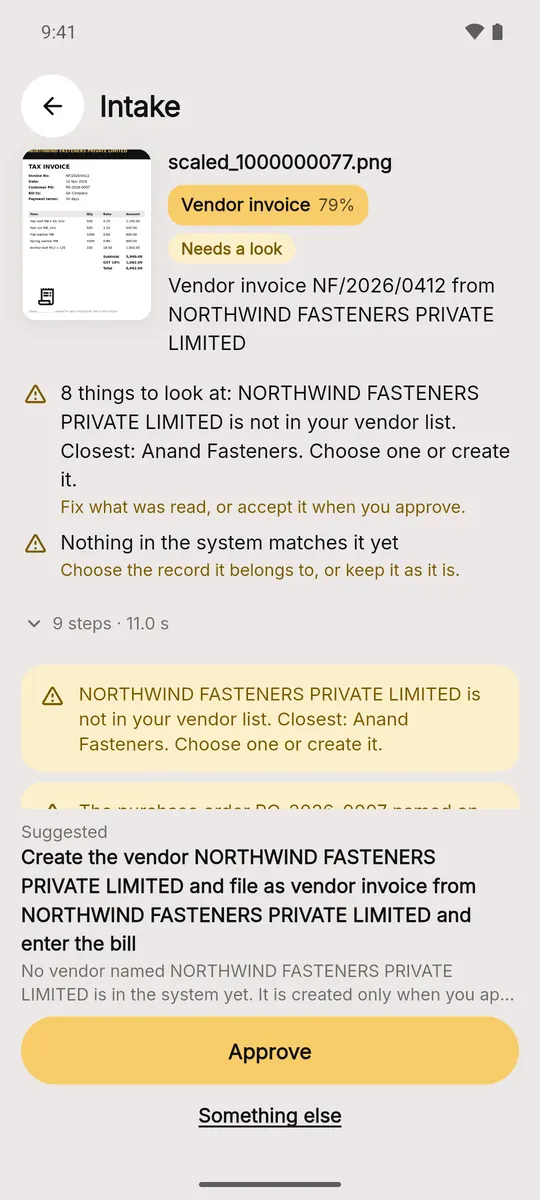
- AI analysis: Velom identifies the document type, such as a vendor invoice, and extracts key values like GSTIN, invoice number, and line items.
- Live review: The system displays the document alongside extracted data. You see the reading stage by stage, highlighting exactly what the AI found.
- Verification: Check if the quantity multiplied by the rate matches the total. The system automatically flags discrepancies, such as invalid GST numbers or missing PO numbers.
- Mapping: If a vendor is new, you can create the record directly from the invoice. You can also map vendor items to your internal SKUs.
- Approval: Once you review the details, click Approve to create the record. Velom never creates a record automatically without your final confirmation.
- Queue management: If you drop multiple files, they are processed one by one in a queue, keeping your work organized.
Example scenario
This is an illustrative example, not a real customer. Before using Velom, a factory store keeper spent approximately 15 hours every week manually entering purchase invoices into a system. This included correcting typos, chasing missing GST numbers, and verifying totals against physical receipts. The process was slow, and errors were common, often requiring the accountant to spend extra time at the end of the month to fix reconciliation issues.
After implementing Velom, the store keeper changed their workflow. Instead of typing, they now scan or upload the invoices as they arrive. The AI reads the data, and the store keeper spends only 3 hours per week reviewing the proposed entries. Because the system flags errors like mismatched totals or unknown SKUs immediately, the store keeper corrects them on the spot. By the end of the week, the records are already in the system, accurate and ready for payment processing. This shift saves 12 hours of manual work, reduces reconciliation errors, and ensures the purchase data is always up to date for the production team.
What to check before you start
Before you begin automating your invoice processing, ensure your internal data is organized. Start by maintaining a clean list of vendors and their correct GSTINs. Check that your inventory SKUs are clearly defined, as the system will need to map these to the items listed on vendor invoices. Verify that your purchase orders are generated or tracked within your system, as three-way matching works best when you can compare the invoice against a PO and a goods receipt.
Additionally, confirm that your team understands the approval workflow. Since the system does not create records without human oversight, assign clear roles for who is responsible for reviewing and approving invoices. Check that your internet connection is stable for the web app and that the Android app is installed on the relevant devices. Finally, review your current accounting practices to ensure that your GST tax rates and HSN codes are up to date with the latest government notifications, as these will be the foundation for your automated verification checks.
Once you are ready, start by testing the system with a small batch of invoices. This helps your team get comfortable with the interface and the approval process. You will soon notice that the time spent on manual data entry drops significantly, allowing your team to focus on more important tasks like production planning and vendor management.
Frequently asked questions
How does Velom handle GST invoice OCR?
Velom uses AI to read vendor invoices uploaded via the Android app or web interface. It extracts data like GSTIN, invoice numbers, and line items, presenting them for your review. It flags errors like incorrect totals or missing POs, and only creates records in your system once you manually approve the data.
Does Velom automatically file my GST returns?
No, Velom does not connect to the GST portal or file any government returns. It helps you manage your internal purchase data and provides the necessary information, but you must perform all filings and tax payments directly through the official government portal.
Can I use Velom if I do not have a PO for every invoice?
Yes, Velom supports both three-way matching for invoices with a PO and two-way matching for those without. You can still use the system to record and verify invoices even if they are not linked to an existing purchase order.
What happens if the AI misreads a number on an invoice?
The system is designed to show you exactly what it read alongside the original document. If a reading is incorrect, you can easily edit or reject the proposal. Velom does not create any records until you have reviewed and approved the data, ensuring you maintain full control over your records.