Document AI5 min read
Reading Purchase Invoices with AI: What to Automate, What to Check
AI can read a vendor invoice in seconds. Here is what is safe to automate, what a person must still check, and how to set up an approval flow that holds up.
By Appikorn team ·
In this article
Short answer
Can AI read handwritten or photographed invoices?
It can often read them, but accuracy drops with poor photos and handwriting. A good system shows how sure it is and asks for a rescan or a manual check when it is not.
Typing purchase invoices into a system is one of the most repetitive jobs in a small company. Someone reads the vendor name, the invoice number, the date, every line with its HSN code, quantity, rate and tax, and keys it all in, then does it again tomorrow. Invoice OCR with AI promises to do the reading for you. It can, but only if you are clear about which steps a machine may take on its own and which still need a person. This guide sets out that line for purchase invoices in India.
How AI invoice reading works
Older invoice OCR turned the image into text and then relied on fixed templates for each vendor: the invoice number is always at this position, the total at that one. It broke whenever a vendor changed their layout. Current AI models read the document more like a person does. They find the vendor, the GSTIN, the lines and the totals wherever they are on the page, from a PDF, a scan or a phone photo.
A sensible system works in stages:
- Classify: is this a tax invoice, a delivery challan, a purchase order, a credit note or something else?
- Extract: header fields (vendor, GSTIN, invoice number and date, place of supply) and every line (description, part number, HSN, quantity, unit, rate, discount, tax rate, amount).
- Link: match the vendor to your vendor list, each line to your item codes, and the invoice to the purchase order and goods receipt it belongs to.
- Check: run arithmetic and tax checks on what was read.
- Propose: suggest what to create (a vendor bill, a goods receipt, new item codes) and wait for a person to approve.
What is safe to automate
- Reading and typing. This is where the time goes, and AI does it well on clean digital PDFs. Scans and photos are harder; a good system says how sure it is and asks for a rescan when it is not.
- Arithmetic checks. Quantity times rate equals amount; the lines add up to the taxable value; CGST plus SGST, or IGST, matches the rate; the grand total matches.
- Duplicate detection. The same file sent twice, or the same vendor and invoice number arriving as a scan and later as a PDF, should be caught every time.
- Linking suggestions. Proposing which vendor, purchase order and item code each part of the invoice belongs to.
- Remembering corrections. When a person maps a vendor's part code to your item code once, the system should remember it next time.
What a person must still check
Automation should stop at a person's approval for anything that changes your books. Before approving, check these:
- GSTIN. Is it valid, and does it belong to this vendor? A GSTIN contains the vendor's PAN, so a mismatch is a red flag. Input tax credit depends on the vendor's GSTIN being right and the invoice appearing in your GSTR-2B.
- Place of supply and tax type. Same state should be CGST and SGST; a different state should be IGST. A wrong tax type means credit trouble later.
- HSN and rate. Is the HSN the one you expect for this item, and does the GST rate fit it? A part that was 18% last month and 28% today needs a question to the vendor.
- Quantity against what arrived. The invoice says 500; did the store receive 500? This is the heart of the three-way match.
- Rate against what was agreed. Compare with the purchase order or the vendor's price list.
- One vendor line, several of your items. Sometimes one line on the invoice covers two of your item codes. A person decides the split.
- New vendors and new items. Creating master data from an invoice is convenient, but a person should confirm before it is created.
The approval flow
A flow that holds up in an audit looks like this:
- Anyone can add the invoice: stores drop the paper copy, accounts forward the mail, purchasing uploads the PDF.
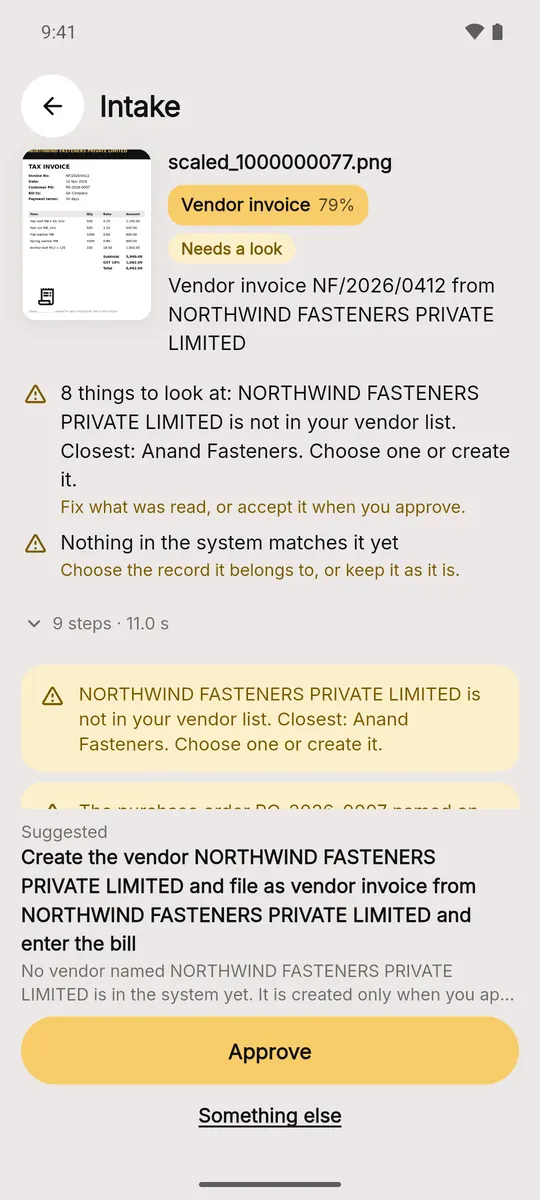
- The AI reads, links and checks, and shows its reading next to the document so a person can compare.
- The person corrects any value by typing the right one; the checks run again.
- The person with the right permission approves. One approval creates everything together (bill, receipt, price history) or nothing at all.
- The bill goes through the match: purchase order, goods received and bill (three-way), or goods received and bill (two-way) where there was no purchase order.
- Mismatches outside your tolerance wait for a decision with a reason, then the bill is approved for payment.
Two rules matter more than any model: nothing is created without a person approving it, and duplicates are refused without an override.
Setting expectations
AI reading is very good on clean, digital invoices and less reliable on crumpled thermal paper, handwritten corrections and photos taken at an angle. Start with your top vendors by volume, measure how often a person has to correct a value, and widen from there. Keep the original file attached to the bill; auditors and your GST team will want it.
A checklist before you switch on AI invoice reading
- Vendor master cleaned up: one record per vendor, GSTIN entered.
- Item codes in place for what you buy repeatedly, with the HSN code.
- Purchase orders raised in the system, so there is something to match against.
- Tolerances agreed with accounts (quantity, price, rupee amount per line).
- Who may approve which kind of document written down.
How Velom helps
Velom's document intelligence puts one button on every page: drop, paste or photograph an invoice and Velom shows the reading live, stage by stage, with how sure it is. A full-screen review shows the document on the left and the steps on the right: vendor, item codes (create or map), add to inventory, purchase order, checks, then one Approve that files everything together or nothing. The checks flag a GST rate that does not fit the tax on the paper and an HSN that differs from the item's, and a GSTIN that is not valid stops a new vendor from being created. Duplicates are never filed twice. Approved invoice lines become price points in vendor pricing, and the vendor bill then runs the three-way or two-way match with tolerances the Owner sets. Nothing is created until a person approves.
Conclusion
Let AI do the reading, typing, arithmetic and duplicate checks, and keep people for the judgement calls: GSTIN, tax type, rates, quantities received and new master data. With one approval step and a proper match, invoice entry goes from a daily chore to a quick review.
Frequently asked questions
Can AI read handwritten or photographed invoices?
It can often read them, but accuracy drops with poor photos and handwriting. A good system shows how sure it is and asks for a rescan or a manual check when it is not.
Does AI invoice reading replace the accountant?
No. It removes the typing. A person still checks GSTIN, tax type, rates and quantities and approves before anything is posted.
What is three-way matching?
Comparing the purchase order, the goods received and the vendor bill line by line before the bill is approved for payment. Two-way matching compares goods received and the bill when there was no purchase order.
How are duplicate invoices caught?
By refusing the same file twice and by recognising the same vendor and invoice number arriving in another form, such as a scan followed by the PDF.