Document AI6 min read
Purchase Invoice Entry Automation: Managing Month-End Paperwork
Month-end piles of invoices and purchase orders can slow down any factory. Discover how batch processing streamlines your document workflow.
By Appikorn team ·
In this article
Short answer
How can I automate purchase invoice entry without manual data entry?
You can use Velom's document intelligence feature to batch-process invoices. By dropping files into the system, the AI extracts the relevant data such as vendor details, line items, and GST numbers. You then review the extracted data on screen and approve it, which creates the records in your system.
The problem: A realistic day in an Indian SME factory
In a typical Indian small-to-medium manufacturing unit, the last week of every month is synonymous with chaos. The store keeper, purchase manager, and accounts assistant find themselves submerged in a sea of paper. Vendor invoices arrive via email, physical courier, and even WhatsApp images. Delivery challans pile up on the desk, often detached from their original purchase orders. The factory floor continues to operate, consuming materials and generating more paperwork, while the office staff struggles to match incoming bills against the goods actually received.
This is not just about a messy desk; it is about the operational bottleneck created when documents are not processed in real-time. When invoices remain unrecorded, the purchase manager has no clear view of the outstanding liabilities. The store keeper spends hours searching for a specific delivery challan to verify a quantity, and the accountant is left chasing vendors for missing GST details or incorrect HSN codes. This cycle of delayed entry prevents the business from having a live, accurate picture of its financial health and inventory status.
What it costs: Time, rework, money, and risk
The cost of manual document processing extends far beyond the salary of the person typing data into a spreadsheet. When data entry is manual, human error is inevitable. A misplaced decimal point or a transposed digit in a GST number can lead to rejected input tax credit claims during GST filing, which is a major compliance risk. Check the latest notification on gst.gov.in to ensure your practices align with current requirements regarding HSN codes and tax reporting.
Furthermore, the time spent on rework is a hidden drain on productivity. If an invoice amount does not match the purchase order, the accounts team must stop, search for the PO, call the vendor, and resolve the discrepancy. This back-and-forth disrupts the entire procurement cycle. When financial records are not updated promptly, the factory risks missing payment deadlines, which can strain vendor relationships. In the long run, this lack of visibility leads to over-ordering or, worse, running out of critical raw materials because the inventory records were never updated after the goods arrived.
How the team did it before: Paper, spreadsheets, and WhatsApp
Before adopting digital tools, most teams rely on a combination of physical files and fragmented digital communication. Invoices are printed and stored in lever-arch files. An Excel sheet acts as the primary ledger, where the purchase assistant manually enters the vendor name, date, invoice number, and total amount. When a vendor sends an invoice via WhatsApp, it is often forgotten or buried under hundreds of other messages. The store keeper maintains a separate register for goods inward, which rarely matches the accounts department's records because the two teams are not working from a single source of truth.
This method is highly reactive. The team spends most of their time "putting out fires" rather than planning production. Because there is no centralized system to link a purchase order to a specific vendor invoice, the matching process is slow and prone to oversight. If a document is lost, the entire trail is broken, making it impossible to verify if a payment is actually due. This manual approach leaves the business vulnerable to duplicate payments and missed credit notes, essentially leaking money through inefficiencies.
How Velom solves it, step by step
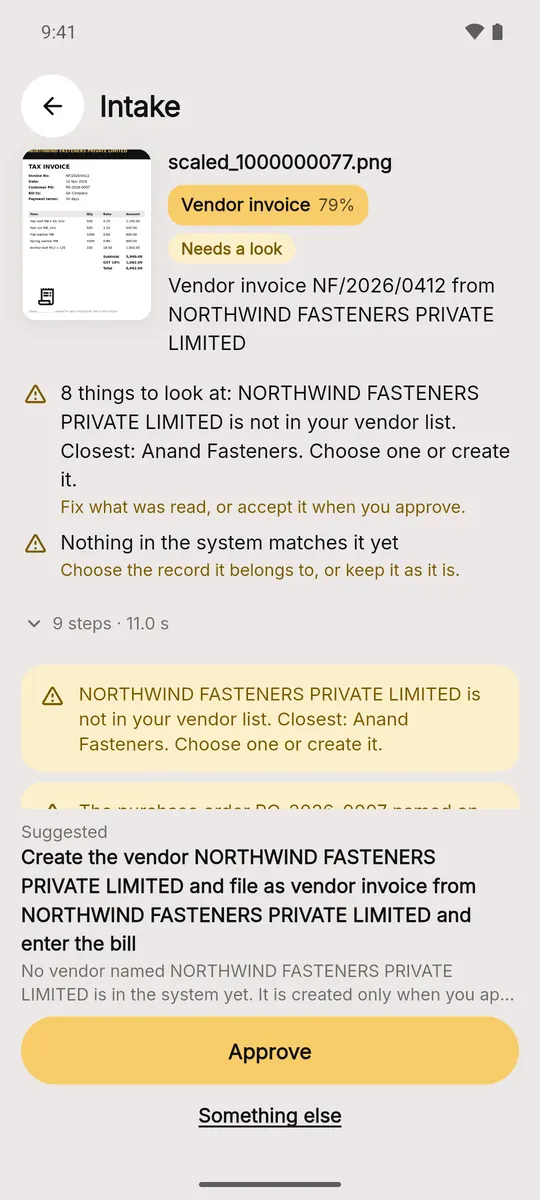
Velom uses document intelligence to turn a chaotic pile of files into structured, actionable data. You can handle a high volume of documents by dropping them into the system as a batch, allowing the AI to process them in a queue. It does not create records blindly; it requires human oversight to ensure accuracy.
- Drop and Queue: Drag and drop your PDFs, images, or spreadsheets into the Velom Intake portal. You can drop several files at once, and they will be processed one by one in a queue.
- AI Extraction: Velom reads the document, identifies its type (invoice, PO, challan, etc.), and extracts key values like document number, GST number, and item codes.
- Live Review: The system presents a full-screen review of the document alongside the extracted data. Any missing information is flagged for you to check.
- Validation Checks: The system automatically flags problems, such as totals that do not add up, invalid GST numbers, or cases where the quantity multiplied by the rate does not equal the amount.
- Approval: Once you verify the extracted data, you approve it. Only then are records created in your system. You can split a vendor line across several of your own SKUs if needed.
- Learning: Velom remembers your corrections and maps vendor codes to your internal SKUs, becoming more accurate with every document you process.
Example scenario
This is an illustrative example, not a real customer. Consider a small engineering workshop that receives 50 purchase invoices and 30 delivery challans every month. In the old system, the accounts assistant would spend roughly 15 hours per month manually typing these into a spreadsheet and another 10 hours chasing discrepancies between the POs and the invoices. This total of 25 hours is often compressed into the last three days of the month, causing extreme stress and frequent errors.
With Velom, the assistant spends 10 minutes each morning dropping the previous day's documents into the Intake portal. The AI reads the documents while the assistant handles other tasks. By the end of the day, the assistant spends only 30 minutes reviewing the flagged items and clicking "Approve" for the correct ones. Over the month, this reduces the total time spent to roughly 5 hours, with significantly higher accuracy. The team now has a live view of their inventory and payables, and they no longer worry about missing a document in the month-end pile. The inventory levels are updated automatically as soon as the goods receipt is approved, ensuring the production team knows exactly what materials are available.
What to check before you start
Before you begin digitizing your document workflow, ensure your team is ready to move away from paper-based habits. Start by organizing your current physical files to ensure you have a clear starting balance for your inventory. Verify that your vendor master list is accurate and that you have mapped your internal SKU codes to the vendor-specific part numbers. This mapping is essential for the AI to correctly identify items on incoming invoices.
Additionally, check your internal processes for document approvals. Who is authorized to approve a vendor bill? Who handles the quality inspection of incoming goods? By defining these roles in your system, you ensure that the automated process follows your company's hierarchy. Finally, ensure your accountant has reviewed your statutory settings, such as tax rates and compliance requirements, to keep your financial reporting accurate. Remember that while automation handles the data entry, the final responsibility for the accuracy of your records remains with your management team.
For more insights on managing your factory operations, explore our resources on reading GST invoices automatically and what to check when automating purchase invoices.
Frequently asked questions
How can I automate purchase invoice entry without manual data entry?
You can use Velom's document intelligence feature to batch-process invoices. By dropping files into the system, the AI extracts the relevant data such as vendor details, line items, and GST numbers. You then review the extracted data on screen and approve it, which creates the records in your system.
Does Velom automatically file my GST returns after processing invoices?
No, Velom does not connect to the GST portal or file any government returns. It helps you manage your internal data and records, but you must still perform your own filings and payments on the official government website.
What happens if the AI cannot read a document correctly?
If the system is unsure about a value or detects a discrepancy, such as an incorrect total or an unknown item, it flags the document. Nothing is created in your database until a person reviews the document and approves the extracted information.
Can I process multiple types of documents at once?
Yes, Velom can identify and process various document types including vendor invoices, customer purchase orders, and delivery challans. You can drop them into the queue together, and the system will categorize them based on the content it reads.