Attendance6 min read
Attendance Regularization: Handling Missed Punches Without Arguments
Managing attendance for shop floor workers often leads to disputes over missed punches. Learn how to standardize the process for smoother payroll operations.
By Appikorn team ·
In this article
Short answer
How does Velom handle attendance regularization when a worker forgets to punch?
Workers submit an attendance correction request directly through the Android app. The supervisor receives this request, verifies it against the floor activity, and approves it within the system. Once approved, the attendance record is updated, and the corrected time is automatically used for payroll processing, ensuring accuracy without manual spreadsheets.
The problem: a realistic day in an Indian SME factory
In a typical SME factory, the morning shift begins with a flurry of activity. Workers arrive at the gates, often in a rush to reach their stations before the whistle blows. The floor supervisor is busy checking raw material availability, while the store keeper is occupied with incoming goods. Amidst this chaos, someone inevitably forgets to punch in. Perhaps the network was slow, or they were distracted by a sudden machine issue. By the end of the shift, the worker realizes they missed their check-out, and the store keeper realizes they forgot to verify a material receipt. This creates a ripple effect, as incomplete data sits in the attendance register, waiting for manual intervention before payroll can be processed.
As the month draws to a close, the HR person faces a mountain of queries. Workers claim they were present, but the physical register or the digital log shows a gap. Arguments ensue, and the supervisor is pulled away from production to verify claims from three weeks ago. This process is not just frustrating; it creates a culture of distrust. Without a clear, standardized way to handle these gaps, the factory loses productive time every single day. The core issue is the lack of a reliable, real-time system that allows workers to own their attendance data while keeping management in control of the final approval.
What it costs: time, rework, money and risk
The cost of poor attendance management is rarely captured in a single ledger, but it is felt across the factory floor. When attendance data is incomplete, HR staff spend days at the end of the month reconciling records. This is time that could be better spent on workforce development or statutory compliance. Every hour spent digging through WhatsApp messages or handwritten notes to verify a shift is an hour lost to inefficiency. Furthermore, manual corrections are prone to human error, which directly impacts payroll accuracy. If a worker is marked absent due to a missed punch, they lose pay, which leads to grievances and potential turnover.
Beyond internal friction, there is a significant compliance risk. Under various Indian labour laws, maintaining accurate records of hours worked is mandatory. Inconsistent logs can lead to issues during audits regarding overtime payments or statutory benefits like EPF and ESI. Check the latest notification from the Ministry of Labour and Employment to ensure your record-keeping meets current standards. When data is fragmented, you cannot accurately calculate the cost of production or measure the efficiency of your shifts. The lack of transparency creates an environment where disputes become the norm, rather than the exception.
How the team did it before
Most factories rely on a combination of legacy methods that have evolved over years. Many started with a simple paper register kept at the security gate. While easy to understand, it is impossible to audit in real-time. If a page goes missing or an entry is smudged, the record is lost forever. As mobile phones became common, WhatsApp groups became the default tool for reporting attendance issues. A worker sends a message to the supervisor: "Sir, I forgot to punch out yesterday at 6 PM." The supervisor then tries to remember if that worker was indeed at their station, often relying on guesswork or a quick glance at the production output.
Spreadsheets are the next step, where someone manually transcribes the paper logs or WhatsApp messages into a master file. This is where the real trouble starts. Formulas break, rows get shifted, and the "latest" version of the file is always in doubt. Because these methods are disconnected from the actual payroll system, the HR team has to perform a massive data cleanup before each pay cycle. It is a reactive, stressful, and error-prone process that leaves no room for verification or audit trails, making it nearly impossible to maintain a clean payroll run without significant manual effort.
How Velom solves it, step by step
Velom provides a structured way to handle attendance, ensuring that every minute is accounted for without the need for endless back-and-forth. By using the face attendance feature, the factory shifts from manual guessing to a verifiable process. Here is how the system handles attendance regularization:
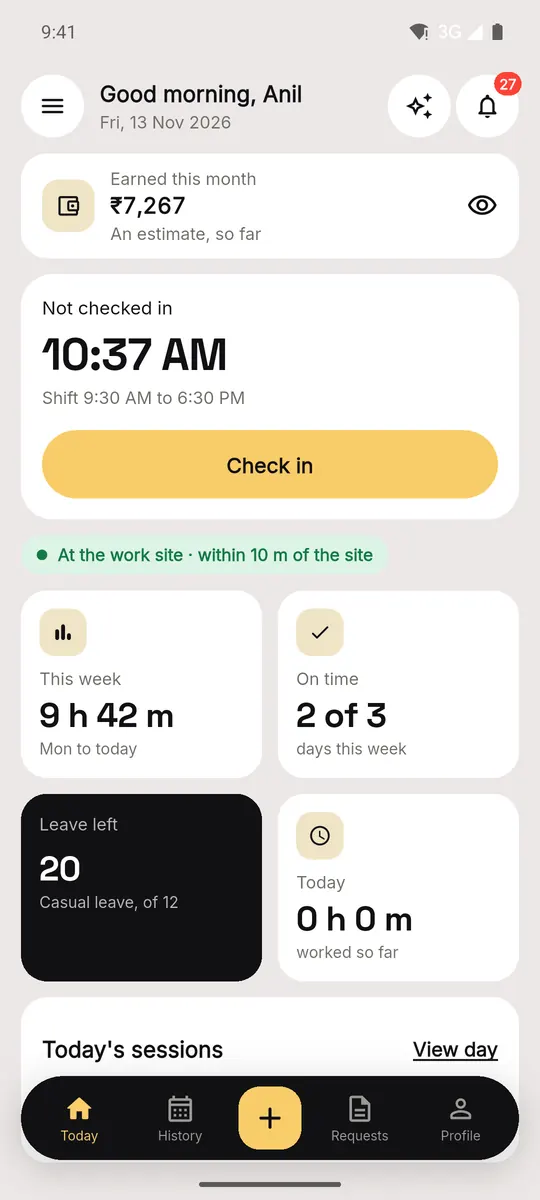
- Workers use the Android app to check in and out. The server stamps the time and records the location, ensuring the punch is legitimate.
- If a punch is missed, the worker submits a request through the app for an attendance correction, specifying the correct time.
- The supervisor receives a notification on their device, allowing them to review the request against the live floor board.
- The manager reviews the request. If the data is valid, they approve the correction with a single click.
- Once approved, the record is updated in the monthly register, which automatically feeds into the payroll calculations.
- The system maintains an audit log, so the Owner or HR can see exactly who requested the change and who approved it, eliminating ambiguity.
- If a worker forgets to check out, the day remains in a 'Needs review' state, preventing the system from guessing or generating incorrect data until the supervisor intervenes.
Example scenario
This is an illustrative example, not a real customer. Consider a worker named Ramesh who works in the assembly section. On Tuesday, Ramesh is so focused on meeting a production target that he forgets to tap the check-out button on his phone before leaving the factory. On Wednesday morning, he notices his app shows his Tuesday shift as 'Needs review'.
Ramesh opens his app and submits an attendance correction request for Tuesday, noting his departure time as 6:30 PM. His supervisor receives a notification on their dashboard. The supervisor checks the production log, sees that Ramesh’s output for the day confirms he was working until the end of the shift, and approves the request. By Wednesday afternoon, the entry is finalized. When the monthly payroll is calculated, the system uses this corrected time, ensuring Ramesh is paid correctly for his hours. Before this, Ramesh would have had to chase the supervisor for days, and HR might have missed the correction, leading to a deduction in his pay and a frustrated employee.
What to check before you start
Before implementing a digital attendance system, ensure your foundation is solid. First, define your shift timings and holidays clearly within the system settings. If you have different departments, ensure each has the correct work location mapped to prevent location spoofing. Verify that all employees have their profiles set up with current contact details so they can access the app. Train your supervisors on the approval flow; they are the first line of defense in ensuring data accuracy. Finally, establish a clear policy for how and when attendance corrections must be submitted—for example, requiring requests to be filed within 24 hours of the shift. This prevents a pile-up of requests at the end of the month and keeps your records clean and audit-ready.
The goal is to remove the friction from daily operations. By digitizing the process, you turn attendance from a source of conflict into a reliable data point that supports your production goals. Whether you are managing a small workshop or a larger facility, the principles of clear communication and verifiable records remain the same. Start by setting your expectations, training your team, and letting the system handle the heavy lifting of data management.
Frequently asked questions
How does Velom handle attendance regularization when a worker forgets to punch?
Workers submit an attendance correction request directly through the Android app. The supervisor receives this request, verifies it against the floor activity, and approves it within the system. Once approved, the attendance record is updated, and the corrected time is automatically used for payroll processing, ensuring accuracy without manual spreadsheets.
Does the system require face recognition to verify attendance?
No, Velom does not use face recognition or store biometric templates. It uses face detection to ensure a person is present when the photo is taken, but it does not identify who that person is. The primary verification is based on the device location and the server-stamped time.
Can workers create their own accounts to start using the app?
No, workers cannot self-register. Accounts must be created by the Owner or HR staff. This ensures that only authorized personnel have access to the system and that roles and permissions are correctly assigned from the beginning.
What happens if a worker forgets to check out for the day?
The system does not guess or assume a check-out time. Instead, it marks the shift as 'Needs review' in the attendance register. This status persists until a supervisor manually enters the correct time and approves it, ensuring payroll is never calculated based on incomplete or inaccurate data.