GST billing6 min read
Credit note and debit note under GST: Managing Billing Corrections
Correcting GST invoices requires precision. Learn how to manage credit and debit notes under GST to keep your factory billing accurate and compliant.
By Appikorn team ·
In this article
Short answer
How do I manage a credit note and debit note under GST?
You manage these by linking them directly to the original invoice within your billing system. This ensures the HSN codes, tax rates, and customer details are consistent. Always document the reason for the adjustment and ensure it is approved by an authorized manager before finalization for audit purposes.
The problem: a realistic day in an Indian SME factory
In a typical electronics assembly unit, the store keeper and the billing clerk operate in a high-pressure environment. A shipment of assembled PCBs is ready for dispatch, but at the last minute, the customer requests a change in the quantity or notices a discrepancy in the item specifications. When the final invoice is generated, errors in the HSN code or incorrect tax calculations—such as misapplying IGST instead of CGST and SGST—often slip through. These mistakes are not merely administrative annoyances; they create significant hurdles in the reconciliation process.
When an invoice is issued with incorrect details, the immediate reaction is often to cancel it entirely, but this is not always possible or legally sound once the goods have left the premises. The team then struggles to issue a proper correction. Without a clear process for handling adjustments, the accounts department spends hours manually tracking which invoice was corrected by which note, leading to confusion during the monthly tax filing period. This cycle of error and manual correction distracts the team from core production tasks.
What it costs: time, rework, money and risk
The cost of poor billing practices manifests in several ways. First, there is the hidden cost of human capital. Skilled staff, who should be focused on improving electronics assembly output or managing inventory, are instead buried in paperwork. Every time a bill needs to be corrected, the entire chain of communication—from the store floor to the accountant—is disrupted. This rework increases the likelihood of further errors, as stressed staff are more prone to mistakes.
Beyond the internal labor cost, there is a substantial financial and compliance risk. Incorrect tax classification, such as using the wrong GST rate or failing to capture the correct HSN code, can lead to discrepancies in the GST portal. While software can assist, the underlying process must ensure that every GST billing action is linked to the original document. If these adjustments are not documented accurately, your business faces the risk of audit queries, potential penalties, and strained relationships with customers who expect professional and accurate documentation.
How the team did it before
Before adopting a structured approach, the team relied on a fragmented system of paper registers, Excel spreadsheets, and informal WhatsApp messages. When a customer returned goods or complained about a billing error, the store keeper would manually write a note on a physical register. The billing clerk would then attempt to create a manual credit note in a separate spreadsheet, often losing track of the original invoice number. This created a "black hole" of information where nobody knew the exact status of a payment or a return.
Communication was equally inefficient. A request for a billing adjustment would arrive via a phone call or a text message. The clerk would then have to search through piles of paper delivery challans to find the matching transaction. Because there was no digital link between the initial dispatch, the invoice, and the subsequent adjustment, the team often duplicated effort or missed the deadline for filing necessary adjustments. This manual reliance made it nearly impossible to maintain a clean, audit-ready record of transactions.
How Velom solves it, step by step
Velom brings order to this process by ensuring every transaction is traceable and every adjustment is linked to its source. By using the platform, the team can manage billing with confidence. Follow these steps to handle corrections effectively:
- Locate the original invoice or bill within the system that requires a correction.
- Select the option to create a credit or debit note directly from the document view, ensuring the system pre-fills the original invoice details.
- Input the reason for the adjustment, such as a quantity mismatch or a price correction, which remains permanently attached to the record.
- Review the calculated tax impact, as the system applies the correct GST split based on the original place of supply.
- Submit the note for internal approval, ensuring that no adjustment is finalized without oversight.
- Once approved, the note is saved as a formal document, and the balance for that customer or vendor is automatically updated in the ledger.
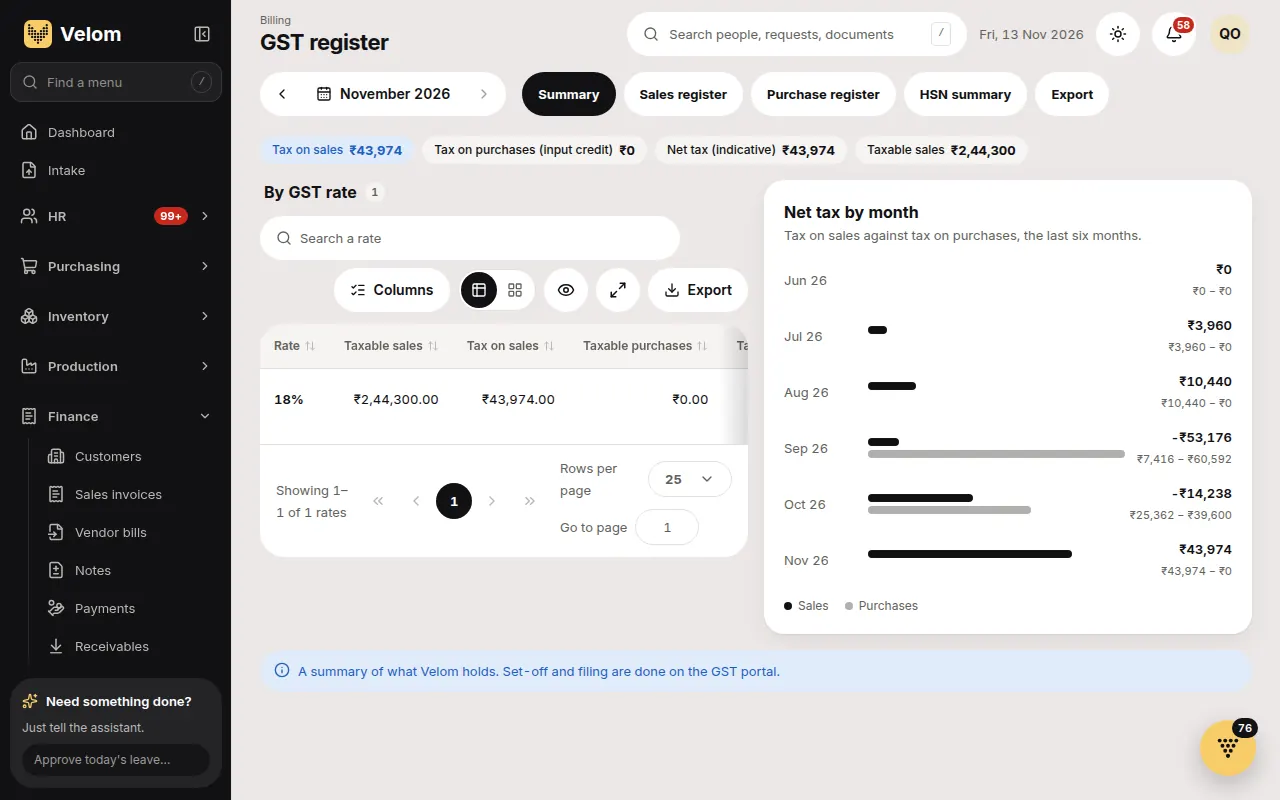
- Export the data as needed for your accountant to manage the final filings on the official GST portal.
Example scenario
This is an illustrative example, not a real customer. In a small electronics unit, the team processes 20 shipments a week. Before using Velom, they spent 10 hours a week on manual billing corrections due to mismatched HSN codes or incorrect tax splits. This included searching for old paper files and reconciling spreadsheets. In one instance, a customer returned 50 units due to a minor defect, and the team spent three hours manually drafting a credit note and trying to link it to the original invoice.
After implementing the system, the same team processes the same 20 shipments in significantly less time. When that same return of 50 units occurred, the clerk pulled up the original invoice in the system, clicked the button to issue a credit note, and the system automatically pulled the HSN and tax details from the original sale. The entire process, including the manager's digital approval, took 15 minutes. The team now spends less than two hours a week on billing-related administration, allowing them to focus on production schedules and quality control.
What to check before you start
Before you begin managing your billing and adjustments, ensure your foundation is solid. First, verify that all your customer and vendor GSTINs are correctly entered and updated in your master records. Check the latest notification regarding HSN requirements, as businesses with higher turnover must use 6-digit codes instead of 4-digit ones. Ensure your team understands the difference between a credit note (issued to reduce the tax liability) and a debit note (issued to increase it) under the current tax framework.
Finally, ensure that your internal roles and permissions are set correctly. Only authorized staff should have the ability to approve credit or debit notes to prevent unauthorized changes. Regularly review your audit logs to see who created which document and when. By maintaining these checks, you ensure that your billing process is not only faster but also compliant with the latest regulations, keeping your factory operations running smoothly without the constant threat of documentation errors.
Efficiency in a factory comes from having a single source of truth. By linking your dispatches, invoices, and adjustments in one place, you remove the guesswork and the manual labor that often leads to errors. Start by digitizing your billing workflow and see how much time your team saves every week.
Frequently asked questions
How do I manage a credit note and debit note under GST?
You manage these by linking them directly to the original invoice within your billing system. This ensures the HSN codes, tax rates, and customer details are consistent. Always document the reason for the adjustment and ensure it is approved by an authorized manager before finalization for audit purposes.
Is it necessary to link a credit note to the original invoice?
Yes, under GST, every credit or debit note must reference the original tax invoice. This connection is vital for accurate tax reconciliation and helps you avoid discrepancies when filing your monthly returns on the government portal.
What should I do if I used the wrong GST rate on an invoice?
If you have issued an invoice with the wrong tax rate, you should issue a credit note to cancel or adjust the incorrect invoice and then issue a fresh, corrected tax invoice. This maintains a clear trail of the transaction for your records.
Does the system file these notes with the government?
No, the system does not file documents with the GST portal. It helps you prepare and manage the data, which you or your accountant can then use to file your returns on the official government website.