Factory operations5 min read
Digitising a small factory: streamlining document entry with AI
Digitising a small factory often fails because staff find new software confusing. Learn how to use AI-assisted document entry to simplify data tasks.
By Appikorn team ·
In this article
Short answer
How can I simplify digitising a small factory for my staff?
You can simplify the process by using AI-driven tools that automate data entry. Instead of forcing staff to manually type long forms, they simply upload documents. The system extracts the data, highlights errors for review, and only creates records after a person approves the information, reducing both effort and mistakes.
The problem: a realistic day in an Indian SME factory
In a typical SME factory, the store keeper and purchase manager spend hours every day manually typing details from vendor invoices and purchase orders into a computer. Imagine a busy morning: the store keeper receives five different shipments, each with a physical delivery challan and a tax invoice. They must verify the GST number, match the HSN codes, and ensure that the quantities listed on the paper match the physical goods sitting on the loading dock. If the software interface is complex, they might spend more time searching for the right menu or field than actually verifying the stock.
New staff often feel overwhelmed by these digital forms. They are used to physical files and quick notes. When they have to navigate through multiple screens to record a single invoice, mistakes happen. A typo in a document number or a missed item code can lead to inventory mismatches that only surface weeks later during an audit. This manual process is not just tedious; it is a bottleneck that keeps your team from focusing on production quality or vendor relations.
What it costs: time, rework, money, and risk
The cost of manual data entry is rarely just about the time spent typing. It is the hidden cost of rework that drains resources. When a store keeper enters the wrong SKU or misses a line item from a vendor invoice, the error propagates through the entire system. The purchase manager then faces a discrepancy when trying to reconcile accounts, and the production team might find themselves short on parts because the inventory records were never updated correctly. This leads to emergency purchases at higher costs to keep the assembly line running.
Furthermore, there is the risk of compliance issues. With GST regulations requiring accurate reporting, incorrect data entry can lead to mismatched invoices, making it difficult to claim input tax credit properly. You can check the latest notification on GST compliance at gst.gov.in. Beyond the financial impact, there is the risk of team burnout. When your best staff spend their entire shift fighting with software, they have no energy left for improvements or managing the shop floor. This creates a culture where technology is seen as a hurdle rather than a tool.
How the team did it before: paper, spreadsheets, and WhatsApp
Before moving to a structured digital system, most factories rely on a mix of physical paper, Excel sheets, and instant messaging. The vendor sends a PDF invoice via email or WhatsApp. The purchase manager prints it out, writes a few notes on the margin, and passes it to the store keeper. The store keeper then manually enters the data into a spreadsheet. This spreadsheet often becomes the "master record," but it is prone to being outdated or overwritten by mistake.
Communication also happens in fragmented channels. A quick question about a missing item on a delivery challan might be buried in a long WhatsApp thread. If the owner asks about the status of a specific order, the team has to hunt through physical files or scroll through chat histories. This lack of a single, reliable source of truth makes it impossible to track performance or identify which vendors are consistently late. The reliance on memory and manual tracking is the primary reason why scaling up feels chaotic for many small manufacturers.
How Velom solves it, step by step
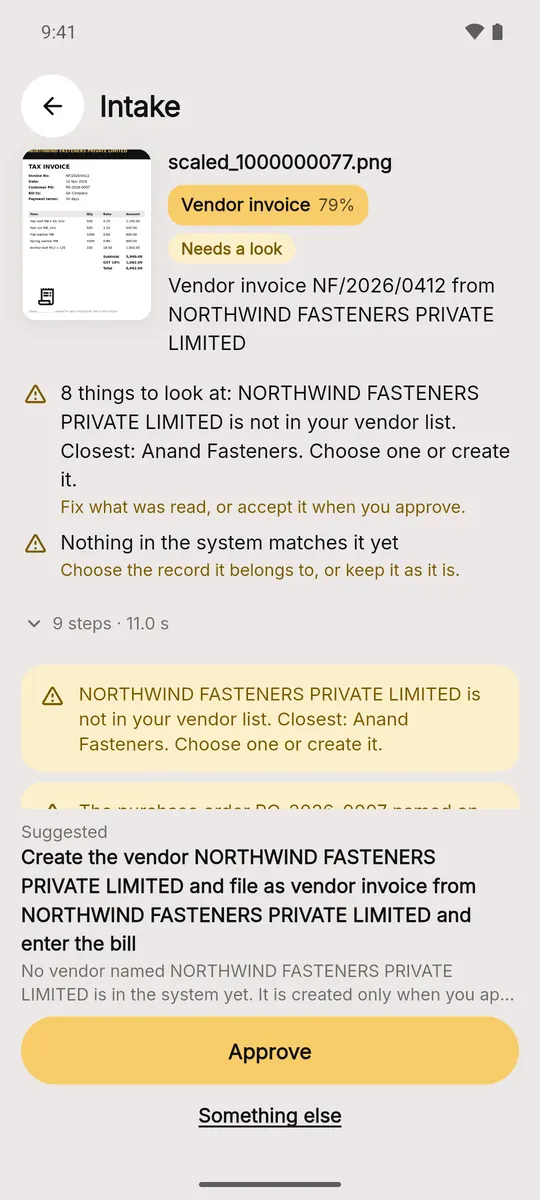
Velom uses document intelligence to turn the chaotic intake of documents into a structured, verified process. Instead of asking staff to fill long forms, the system reads the document and presents a proposal for them to review. This ensures that no data is created in your system without human oversight.
- Drop the file: The store keeper drops a PDF invoice, a photo of a challan, or a scanned PO into the Velom interface.
- AI analysis: The system reads the document, identifies the type (invoice, PO, or challan), and extracts key values like document numbers, GST details, and line items.
- Live review: A full-screen view shows the original document side-by-side with the extracted data.
- Flagging issues: Velom automatically highlights discrepancies, such as a total that does not match the sum of lines, an unknown SKU, or a missing GST number.
- Review and fix: The staff member can quickly map a vendor line to an existing SKU or create a new one if needed.
- Approval: Once the details are verified, the user clicks "Approve," and the system creates the records instantly.
- Learning: The system remembers these mappings, making future entries for the same vendor even faster.
Example scenario
This is an illustrative example, not a real customer. Consider a medium-sized workshop that processes 20 vendor invoices per week. Before using Velom, the store keeper spent roughly 15 minutes per invoice, including typing data and fixing errors found later. This total of 5 hours per week was often interrupted by other shop floor duties, leading to frequent mistakes and backlogs that pushed work into the weekend.
After implementing the document intelligence feature, the store keeper simply drops the files into the queue. The AI extracts the data in seconds. The store keeper spends about 2 minutes per document to verify the extracted fields and click "Approve." The weekly time spent on invoice entry drops to roughly 40 minutes. Because the system flags missing info or math errors immediately, the team no longer spends time on end-of-month reconciliations to find why the inventory balance doesn't match the purchase ledger. The process becomes predictable, allowing the team to focus on inventory accuracy rather than data entry.
What to check before you start
Before you begin digitising your factory processes, ensure your team is prepared for the shift in workflow. Start by gathering all your current vendor lists and SKU codes to ensure the data you are feeding into the system is clean. Verify that your staff have the necessary access to the web app or Android app. It is also helpful to define clear roles; decide who is responsible for approving invoices versus who is responsible for scanning them. Finally, ensure your accountant has reviewed your tax settings, as you should always confirm statutory values and tax structures before relying on them for your GST billing or financial reports. Taking these small steps will ensure that your transition to a digital system is smooth and effective for everyone involved.
Frequently asked questions
How can I simplify digitising a small factory for my staff?
You can simplify the process by using AI-driven tools that automate data entry. Instead of forcing staff to manually type long forms, they simply upload documents. The system extracts the data, highlights errors for review, and only creates records after a person approves the information, reducing both effort and mistakes.
Does the system automatically file my GST returns?
No, the system does not file any returns or communicate with government portals. It helps you maintain accurate internal records, which makes preparing for your filings much faster and more reliable, but the final submission must always be done by you on the official government portal.
What happens if the AI reads a document incorrectly?
The system is designed to flag uncertain readings for your team to check. Nothing is ever created in your database without a human reviewing the information and clicking approve. You retain full control over the data, and the system learns from your corrections to improve accuracy over time.
Do I need special hardware to use these features?
No, you do not need any special hardware. You can use the Velom Android app to scan documents or the web app on any computer to drop files. It works with standard PDFs, photos, and spreadsheets, ensuring you can digitise your operations without expensive investments in scanners or terminals.