Attendance7 min read
Face Recognition Attendance for Factories in India: A Practical Guide
How face check-in works on the shop floor, what to set up for shift workers, and how to handle consent and privacy under India's DPDP Act.
By Appikorn team ·

In this article
Short answer
Does a face attendance app need internet at the gate?
It needs a connection to send the punch to the server. If the signal is weak, choose an app that tells the worker clearly whether the punch was recorded, and agree on what to do when it was not.
A face attendance app replaces the punch card, the register at the gate and the fingerprint reader that stops working when hands are oily or dusty. For a factory in India the appeal is simple: every worker already carries a phone, a photo is harder to fake than a signature, and the record reaches HR the same minute instead of at the end of the month. This guide explains how face recognition attendance actually works, what to decide before you roll it out, and how to stay on the right side of India's data protection law.
How face recognition attendance works
The words "face recognition" cover two quite different things, and it is worth knowing which one you are buying.
- Face detection checks that a real face is in front of the camera at the moment of the punch, and takes a photo. A person (a supervisor or HR) can look at the photo later. Nothing about the face is stored as a template.
- Face matching builds a mathematical template of each worker's face at enrolment and compares every new photo against it. It can name the person automatically, but it means storing biometric templates and managing false matches.
Either way, a good system adds two more checks that matter more than the face itself: where the punch was made (the phone's location against the boundary of your site) and when (the server's clock, not the phone's). A photo taken at the gate at 8:58 with the phone inside the site boundary is strong evidence. A photo taken from a bus stop two kilometres away is not, however clear the face.
Why factories move away from registers and fingerprint readers
Most factories have the same problems with their current method:
- Proxy punching. One worker signs or punches for a friend who arrives late or not at all.
- Readers that fail. Fingerprint devices struggle with worn, cut or greasy fingers, and a queue forms at shift change.
- Late data. The register is typed into a spreadsheet days later, so overtime and loss of pay are argued about after salaries are paid.
- Several sites. A worker who goes to a vendor's unit or a customer's site has no reader to punch on.
A phone-based face attendance app solves the last two by design. It reduces proxy punching because a photo with a location and a time is much harder to fake than a tick in a register, and anything doubtful is flagged rather than silently accepted.
Setting up face attendance for shift workers
Before anyone downloads an app, settle these points. They decide whether the system is trusted on the floor.
- Define your sites. Mark each work location with its address and a boundary (a radius around the gate is enough for most units). Decide what happens to a punch outside it: refuse it, or accept it and flag it for review. Flagging is usually fairer, because GPS is imprecise inside sheds and basements.
- Define your shifts. Start time, end time, grace minutes for late arrival, and how a night shift that crosses midnight is counted. Write down how overtime starts: after the shift's hours, or after eight hours in the day.
- Decide who needs a photo. Many companies require a photo for shop-floor staff and only location for office staff or field engineers.
- Plan for workers without smartphones. A shared phone or tablet at the gate, used one person at a time, works if each worker signs in with their own account.
- Write the correction process. People forget to check out. Decide who may correct a punch, whether the worker can ask for a correction, and that every correction keeps the original record.
Stopping proxy punching without treating everyone as a suspect
The goal is not to catch people; it is to make the honest punch the easy one. Practical rules that work:
- Take the photo automatically when one clear face is in the frame, so there is no time to point the camera at a printout or a second person.
- Refuse locations that the phone itself reports as fake (mock location apps).
- Flag rather than block: outside the site, no location, low GPS accuracy, an old location reading, a phone clock that is ahead, or travel between two sites that is too fast to be possible.
- Have a supervisor review flagged punches every day, not at month end. A flag reviewed the same day is a two-minute conversation; a flag found during payroll is a dispute.
Accuracy: what can go wrong and how to handle it
No method is perfect. Phones in poor light, workers wearing masks or helmets, and GPS drift inside steel buildings all cause trouble. Plan for it:
- Put the check-in point where there is light, ideally at the gate rather than inside the shed.
- Allow a manual shutter after a few seconds if the camera cannot find a face, and let the reviewer see the photo.
- Keep the radius of the site boundary realistic. Too small and every punch is flagged; too large and the boundary means nothing.
- Track the number of flags per week. If one site produces most of them, the fault is usually the boundary or the signal, not the people.
Consent and privacy under the DPDP Act
A worker's photo and location are personal data. India's Digital Personal Data Protection Act, 2023 (DPDP Act) applies to them, and its rules were notified in November 2025 with a phased start. In practical terms, an employer should:
- Give a clear notice that says what is collected (photo, location, time), why (attendance and pay), how long it is kept and who processes it.
- Collect only what you need. If detection plus a photo is enough for your purpose, you do not need to store face templates. Collecting location only at the moment of the punch, not all day, is easier to justify.
- Limit who can see it. Supervisors need to see flagged punches for their team, not everyone's photos.
- Set a retention period and delete old photos when it ends.
- Explain how a worker can ask questions or correct their data.
The Act and its rules are new and the phased dates matter, so read the current text on the MeitY website and check your notice with your legal adviser. Labour law registers (such as the muster roll your state requires) still have to be maintained; the app is the source of that record, not a replacement for the obligation.
A rollout checklist
- Sites and boundaries entered and tested with a walk around the premises.
- Shifts, grace time and overtime rules written and entered.
- Privacy notice shared with workers, in a language they read.
- A one-week pilot with one department, with the old register kept in parallel.
- Compare the pilot's hours with the register, fix the differences, then switch over.
- Daily review of flags by supervisors; weekly look at the attendance register by HR.
How Velom helps
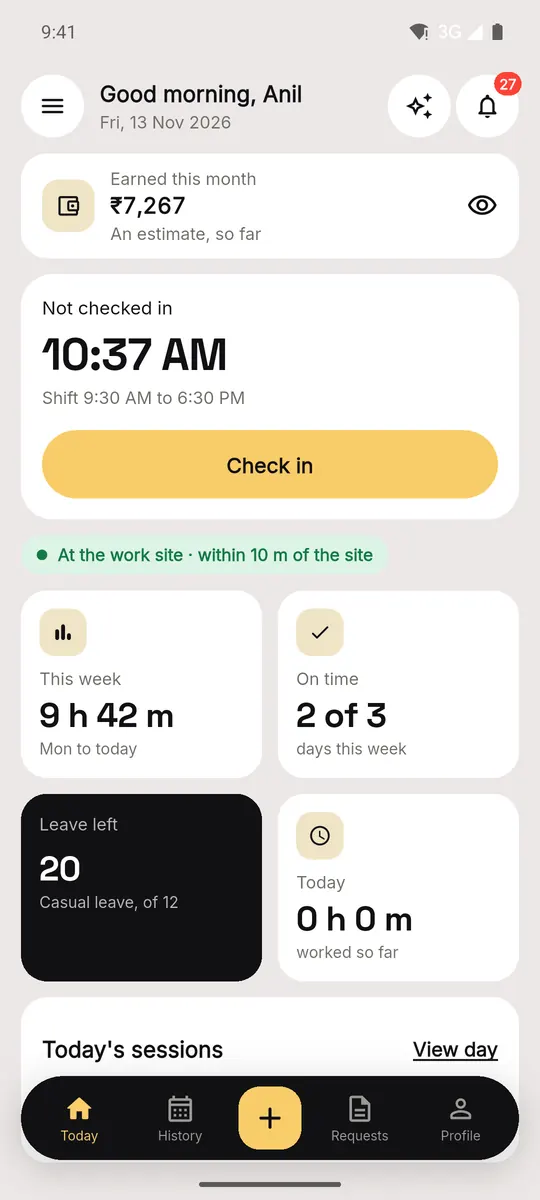
Velom's attendance works on the worker's Android phone. When your company asks for a photo, the camera takes it by itself as soon as one clear face is in the round frame; the face is found on the phone and no face template is stored, so Velom checks that a face is present and leaves the "who is this" judgement to the reviewer. Every punch carries the location, and the server measures the distance to the site boundary itself. Doubtful punches get one of eight flags (such as outside the work site, fake location, low accuracy or impossible travel) and land in a Flagged punches list for managers. A live board shows who is in, and the same register feeds payroll, so the days and hours used for salary are the ones everyone already saw.
Conclusion
Face attendance works in a factory when the setup is honest: realistic site boundaries, clear shift rules, flags that a person reviews the same day, and a privacy notice workers understand. Get those right and attendance stops being a monthly argument and becomes a record everyone trusts.
Frequently asked questions
Does a face attendance app need internet at the gate?
It needs a connection to send the punch to the server. If the signal is weak, choose an app that tells the worker clearly whether the punch was recorded, and agree on what to do when it was not.
Is face detection the same as face recognition?
No. Detection checks that a live face is in front of the camera and takes a photo. Recognition or matching compares the face with a stored template to identify the person.
Do workers have to give consent for photo attendance?
Under the DPDP Act an employer must give a clear notice and process personal data for a lawful purpose. Employment purposes have specific provisions, so check the current rules and your notice with a legal adviser.
Can face attendance stop all proxy punching?
It makes proxy punching much harder, especially combined with location checks and a server clock. Flags that a supervisor reviews daily close most of the remaining gaps.
What about workers who do not have a smartphone?
A shared phone or tablet at the gate works if each worker signs in with their own account and the photo is taken at that moment.