Attendance6 min read
Face Attendance for Factory Workers: Managing Shifts and Locations
Managing factory floor attendance requires precision to avoid payroll errors and proxy punching. Discover how to streamline check-ins for your team.
By Appikorn team ·
In this article
Short answer
How does Velom prevent proxy punching for factory workers?
Velom prevents proxy punching by requiring a live photo for every check-in, which is captured automatically by the camera when a face is detected. Additionally, the system uses geofencing to verify that the employee is physically at the registered work site, ensuring that punches from outside the premises are flagged for management review.
The problem: a realistic day in an Indian SME factory
It is 8:15 AM at a small manufacturing unit on the outskirts of an industrial hub. The morning shift is starting, and the factory gate is crowded. A group of operators is pushing toward the punch machine. One worker reaches over the shoulder of another to swipe a card for a friend who is still two blocks away. The machine itself, a dusty device mounted on a pillar, is showing a flickering screen. It occasionally fails to register a thumbprint, leading to a line of frustrated workers and a supervisor trying to manually note down names on a scrap of paper.
Inside the office, the HR administrator is already bracing for the end of the month. She knows that by the 30th, she will have to reconcile these incomplete machine logs with handwritten notes and verbal claims from supervisors. Every day, the same arguments arise: someone claims they were present but the machine didn't record it, or someone else disputes a late mark because they were "just outside" the gate. This daily friction is not just about time; it is about the reliability of the entire production schedule.
What it costs: time, rework, money and risk
The cost of inaccurate attendance tracking ripples through the entire factory. When an operator is marked absent but is actually working, or when a proxy punch masks a late arrival, the production manager loses visibility into the real capacity of the shop floor. If the attendance data is wrong, the payroll run becomes a nightmare of corrections, adjustments, and manual overrides. This consumes hours of management time that could be better spent on production planning or quality assurance.
Beyond the administrative burden, there is a financial risk. Paying for hours not worked or failing to account for overtime correctly can lead to disputes under the labour laws. If the data is unreliable, the company may face issues during audits related to statutory compliance like PF or ESI. Furthermore, when workers feel that the system is unfair or easily manipulated, it creates a culture of indiscipline. A broken or untrustworthy attendance system effectively signals to the workforce that rules are optional, which can have long-term consequences for shop floor efficiency.
How the team did it before: paper, spreadsheets, WhatsApp
Before moving to a digital system, most factories rely on a combination of legacy methods. The most common is the paper register kept at the security cabin. A guard writes down the time as people walk in, which is prone to human error and bias. Sometimes, a supervisor keeps a separate notebook, and these two records rarely match. By the end of the week, someone has to type all these names and times into a spreadsheet, which is where the real errors start.
WhatsApp often becomes the informal channel for attendance management. Employees send messages to the HR manager saying, "I'm coming late, please mark me present," or "I forgot to punch out." These messages get lost in the noise of daily operations. The HR person then has to scroll through hundreds of messages to piece together the actual working hours for a single employee. This creates a fragmented record that is impossible to audit and highly prone to loss, making it difficult to verify attendance when a worker asks for their loss of pay details.
How Velom solves it, step by step
Velom changes this by moving the accountability to the individual's phone while keeping central control with the Owner. The system uses geofencing to ensure that punches only happen at the work site and requires a live face photo for every check-in.
- The Owner defines shifts, holidays, and specific work locations within the face attendance settings.
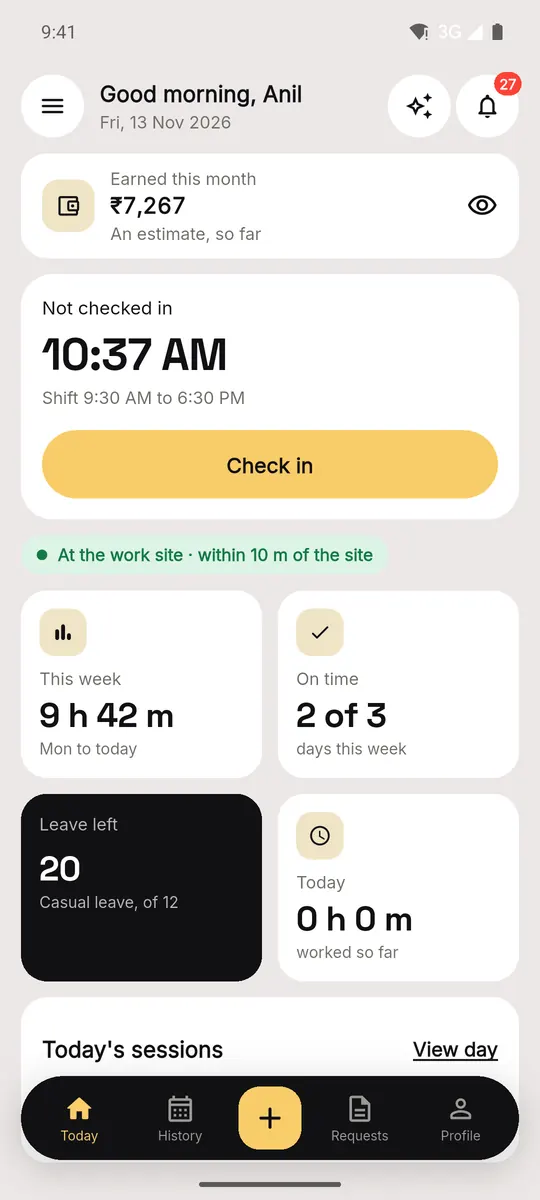
- Employees use the Android app on their phones to check in and out with a single button.
- The server validates the location by measuring the distance between the phone and the factory site; punches outside the geofence are flagged for review.
- When the punch photo setting is enabled, the camera automatically captures a photo of the person in the frame to prevent proxy punching.
- The server, not the phone, timestamps the session to ensure accuracy.
- If a worker forgets to check out, the day remains as "Needs review" until the manager approves the actual time, preventing guessed hours.
- All punches, including flagged ones, flow directly into the monthly register, which acts as the source of truth for payroll.
Example scenario
This is an illustrative example, not a real customer. Consider a factory with 20 workers on a single shift. Before using Velom, the HR manager spent four hours every Friday reconciling the gate register with WhatsApp messages. On Monday, an operator arrives 15 minutes late. Instead of arguing, he opens the app, checks in, and the system records the exact time. The manager sees this on the live board immediately.
On Wednesday, a worker tries to have a friend check in for him from outside the premises. Because the geofence is set to the factory gate, the app flags the punch as "Outside location." The manager reviews the flag, sees the distance, and rejects the entry. On Friday, the HR manager opens the monthly register. Every day is already populated with accurate data. There are no missing punch-outs because the system flagged them for review earlier in the week. The manager spends 15 minutes checking the few flagged anomalies instead of four hours of manual data entry. The payroll run is calculated instantly based on the verified hours, and the team moves on to production tasks without the usual month-end stress.
What to check before you start
Before implementing a mobile-based attendance system, ensure your infrastructure is ready. First, define your work locations clearly; if you have multiple sites, each one needs its coordinates set in the app. Second, decide on your shift policies. Will you allow grace periods for late arrivals? Will you enable automatic leave recording for absences? These settings should be configured by the Owner before the team starts using the app.
Third, communicate the policy to your staff. Explain that the app uses location and camera access to ensure fairness for everyone, not to track them outside working hours. Make sure every employee has the app installed on a registered device. Finally, ensure your HR or payroll staff understands how to review flagged punches. The system provides the data, but the manager must make the final call on exceptions. By setting these ground rules early, you ensure the transition is smooth and that the system works as intended from day one.
Using a digital tool for attendance removes the ambiguity that leads to disputes. When the system records the location and time objectively, the need for manual logs and constant follow-ups disappears. This allows the factory team to focus on production rather than administrative troubleshooting.
Frequently asked questions
How does Velom prevent proxy punching for factory workers?
Velom prevents proxy punching by requiring a live photo for every check-in, which is captured automatically by the camera when a face is detected. Additionally, the system uses geofencing to verify that the employee is physically at the registered work site, ensuring that punches from outside the premises are flagged for management review.
Does the app track employees when they are not at work?
No. The system only checks the phone's location at the exact moment the employee presses the check-in or check-out button. It does not track movement or location outside of these specific actions.
What happens if a worker forgets to check out?
Velom does not guess the checkout time. The day is marked as 'Needs review' in the system. The manager must then enter the actual time based on the worker's report, and this manual entry is recorded for audit purposes.
Can I use Velom on an iPhone?
Velom offers an Android app for check-ins, while iPhone users can access the same features by using the web app through their mobile browser.