Inventory6 min read
Stock register format for factory stores: tracking inventory by lot
A robust stock register format is essential for Indian factories to maintain accurate inventory levels, trace defective batches, and prevent financial loss.
By Appikorn team ·
In this article
Short answer
How does a proper stock register format help in a factory store?
A proper stock register format tracks every item by SKU, location, and lot. By linking inventory movements to specific vendor invoices and purchase rates, it ensures that your physical stock matches your books, allows for easy traceability of defective parts, and prevents production delays caused by missing components.
The problem: a realistic day in an Indian SME factory
In a typical electronics assembly unit, the store keeper begins the day facing a mountain of components. A delivery of capacitors arrives from a vendor, but the accompanying paperwork is messy. Some items have part codes that do not match the internal system, and others lack clear batch information. By midday, the production manager arrives, urgently demanding a specific resistor for an ongoing assembly order. The store keeper checks the physical shelves, but the count in the ledger does not match the items physically present. This gap is a recurring nightmare for many factory owners.
The store keeper is forced to rely on memory or scattered notes to locate parts. When a component turns out to be defective during the testing phase, the team cannot trace it back to the specific purchase invoice or vendor. This lack of visibility turns a simple production task into a frantic search mission. Without a reliable stock register format that links every movement to a specific batch and source, the store remains a black box where inventory goes missing and quality issues remain hidden until it is too late.
What it costs: time, rework, money and risk
The cost of poor inventory control is far higher than the value of the missing parts. When the store keeper cannot identify which batch a faulty component came from, the entire production run is often halted. This leads to massive rework, where finished boards must be dismantled and fixed, consuming hours of skilled labour that could have been spent on new production. The financial impact of these delays, combined with the cost of wasted materials, quickly erodes the thin profit margins of a small manufacturing unit.
Beyond the immediate production delays, there is the hidden cost of capital tied up in excess stock or obsolete parts that no one knew were sitting in the back of the store. When the system is unreliable, procurement managers tend to over-order to avoid being caught short, leading to cash flow issues. Furthermore, if a faulty batch is not identified, it may reach the end customer, leading to returns and a damaged reputation. Maintaining an accurate ledger is not just about counting items; it is about protecting the operational health of the entire factory.
How the team did it before: paper, spreadsheets, WhatsApp
Before moving to a structured system, most factories rely on a combination of physical registers, Excel spreadsheets, and informal communication. The store keeper writes down receipts in a notebook, which is often misplaced or damaged by dust and humidity. Later, these notes are manually typed into an Excel file on a shared office computer. Because the file is not updated in real-time, the production manager often works with outdated information, leading to conflicting views of what is actually available on the floor.
Communication often happens over WhatsApp, where messages about incoming stock or urgent requirements are easily buried under dozens of other chats. There is no central source of truth. If a vendor sends a tax invoice, it sits on a desk until the end of the week, when someone finally gets around to entering the details. By then, the physical goods have already been moved or used, and the link between the invoice, the specific batch, and the current stock level is broken. This fragmented approach makes it impossible to perform an audit or reconcile stock when discrepancies arise.
How Velom solves it, step by step
Velom transforms the store into a transparent, audit-ready space by linking every movement to a specific batch and source. By moving away from manual entry, the store keeper ensures that the ledger is always accurate and up-to-date. Follow these steps to manage your inventory effectively:
- Use document intelligence to scan or drop vendor invoices. Velom reads the document, identifies the items, and helps you create or match them to your internal SKUs.
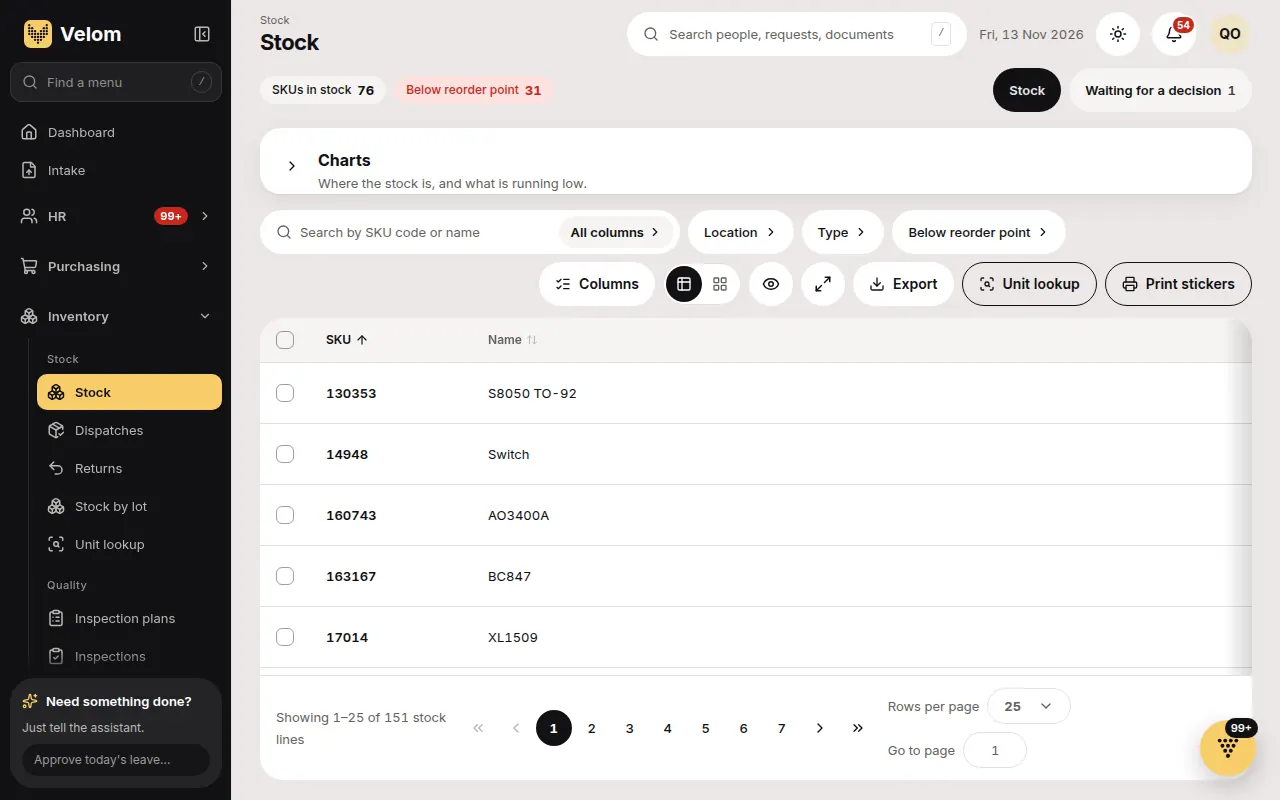
- Receive goods directly from an invoice or a purchase order. Each receipt is recorded as a specific lot, capturing the vendor, invoice number, and rate paid.
- Print unique 10-character QR stickers for every unit or box. Scanning these stickers later allows you to see the entire history of that specific unit.
- Record every movement—receipts, production issues, or returns—as a line in a ledger that cannot be changed. This ensures the balance always matches the sum of movements.
- Monitor stock levels for each SKU. Velom flags when an item falls below the reorder point, preventing production stoppages.
- Use the production module to issue kits for assembly. The system tracks parts issued, returned, and used, ensuring that variance is identified immediately.
- Review the stock by lot report to see the current quantity, value, and average rate paid per vendor, providing clear insights for future procurement.
Example scenario
This is an illustrative example, not a real customer. On Monday, the store keeper receives 500 microcontrollers from a new vendor. Instead of writing it in a notebook, they use Velom to process the vendor invoice. The system automatically creates a new lot for these 500 units, linking them to the invoice date and price. By Wednesday, the production team starts an assembly run. They request 200 units. The store keeper uses the app to "issue" these units to the production order. Velom subtracts them from the stock and updates the ledger instantly.
On Friday, the QC team finds that 10 units are defective due to a soldering issue on the board. Because every unit was linked to a specific lot upon receipt, the manager checks the inventory records and identifies exactly which vendor supplied that batch. They find that the issue is isolated to this specific delivery. They return the remaining parts to the vendor and update the system with a return movement. By the following Monday, the production manager has a clear report showing the remaining stock, the value of the materials consumed, and the record of the return, all without a single paper register being touched.
What to check before you start
Before implementing a new inventory system, ensure your foundation is solid to avoid data errors later. A clean start is better than trying to fix years of messy records.
- Organise your physical store with clear labels and designated zones for each SKU.
- Define your units of measure (e.g., pieces, kilograms, sets) consistently across all documents.
- Ensure all staff members have the correct roles and permissions to perform their specific tasks.
- Gather your current stock counts and reconcile them with your existing ledger one last time.
- Check the latest notification from the GST portal regarding HSN code requirements for your specific industry.
- Create a simple, digitised version of your bill of materials to ensure the system knows exactly what components are required for each product.
By digitising your stock, you remove the guesswork from the factory floor. When every movement is recorded against a source, you gain the confidence to scale your production without the fear of missing parts or unaccounted costs. Start by focusing on one product line, and gradually bring all your inventory under this controlled, lot-based tracking system.
Frequently asked questions
How does a proper stock register format help in a factory store?
A proper stock register format tracks every item by SKU, location, and lot. By linking inventory movements to specific vendor invoices and purchase rates, it ensures that your physical stock matches your books, allows for easy traceability of defective parts, and prevents production delays caused by missing components.
Can I track the quality of components using lot tracking?
Yes. By recording the vendor and invoice details for every lot received, you can trace defective items back to their source. This helps you identify if a quality issue is limited to a specific delivery or a recurring problem with a particular supplier.
How do I handle stock movements for job work units?
You should record goods sent to job workers as specific movements in your inventory ledger. This keeps the parts in your system while marking them as held at the vendor, allowing you to reconcile what was sent and what has been returned against your job work challans.
Is it necessary to use QR codes for all inventory items?
While not mandatory for everyone, using 10-character QR stickers for units or boxes significantly improves accuracy. Scanning a sticker provides instant visibility into the item's history, reducing manual entry errors and making stock audits much faster.