Purchasing6 min read
One Part, Many Vendors: Keeping a Vendor Price List per Item
Managing component costs across multiple suppliers is a major challenge for Indian SMEs. Learn how to maintain a reliable vendor price list per item.
By Appikorn team ·
In this article
Short answer
How can I maintain a vendor price list per item effectively?
You should record every quote received from vendors directly into your SKU records, including the date and source. By setting a price policy such as 'latest paid' or 'lowest price' in your software, the system can automatically suggest the correct rate for every new purchase order you generate.
The problem: a realistic day in an Indian SME factory
In a typical Indian manufacturing unit, the purchase manager often starts their day by juggling phone calls and WhatsApp messages from various vendors. A critical component, such as a specific grade of steel or a standard electronic chip, is required for an urgent production order. The store keeper reports that the stock is low, and the purchase manager must decide which supplier to call. Without a centralized system, they rely on memory or a scattered collection of recent invoices to guess who offers the best price.
Often, the manager calls three different distributors, each quoting a different price based on the current market fluctuation or the quantity ordered. Because there is no structured vendor price list per item, the decision is made based on whoever answers the phone first or promises the fastest delivery. This reactive approach leads to inconsistent procurement costs, where the factory ends up paying a premium for parts that could have been sourced more affordably from a regular supplier. The lack of clear visibility into historical pricing makes it nearly impossible to negotiate better terms or track how vendor rates have moved over the last few months.
What it costs: time, rework, money and risk
The cost of poor procurement practices extends far beyond the price of a single component. Every time a purchase manager has to manually verify a rate or argue about an invoice discrepancy, valuable time is lost. When the price charged on a vendor invoice does not match what was agreed upon, the accounts team must spend hours performing reconciliations or seeking approvals for the difference. This process creates a significant administrative burden that distracts staff from more productive tasks like production scheduling or quality control.
Financially, the impact is cumulative. Paying higher-than-necessary rates for raw materials reduces the profit margin on every finished product. Furthermore, there is the risk of supply chain instability. If the factory does not track lead times and pricing trends, they may find themselves over-reliant on a single vendor who suddenly raises prices or runs out of stock. Without a clear record, the factory owner is left guessing the true cost of production, making it difficult to set competitive prices for customers or manage cash flow effectively during lean periods.
How the team did it before: paper, spreadsheets, WhatsApp
Before adopting a systematic approach, most factory teams rely on a chaotic mix of physical files and digital fragments. The purchase manager keeps a thick file of printed invoices, while the store keeper maintains a handwritten register of incoming goods. When a price check is needed, the team searches through WhatsApp chats, trying to find a message from a vendor sent weeks ago. This method is prone to human error; a digit is easily misread, or a discount discussed over the phone is forgotten when the final bill arrives.
Spreadsheets are often used as a temporary fix, but they rarely stay updated. One person might update a cell, but others continue using an older version of the file, leading to conflicting data. When the accounts team tries to match a purchase order with an invoice, they often find that the rates do not align because the purchase order was based on an outdated price. This cycle of manual entry and correction is not only slow but also provides no audit trail, making it impossible to hold anyone accountable when mistakes occur in the procurement cycle.
How Velom solves it, step by step
Velom organizes your procurement by ensuring that every price, vendor, and purchase order is tracked systematically. By using the platform, you can maintain a clear history and ensure that your team always uses the correct pricing data.
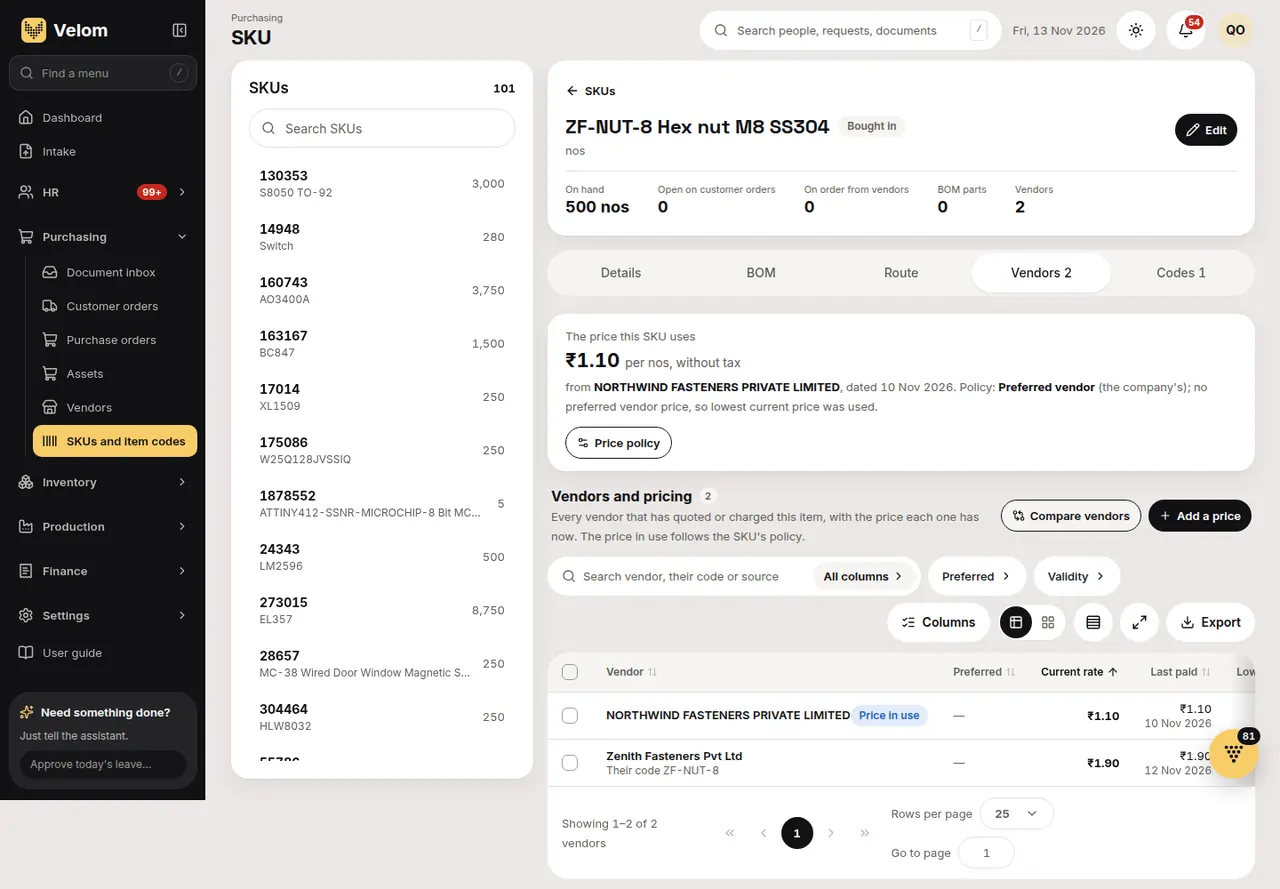
- Record every quote: Each time a vendor provides a price, enter it into the SKU record in Velom. Every price is stored with its date and source, building a reliable history.
- Define your price policy: Set your preference in the system—whether you want to use the preferred vendor, the lowest price, the latest paid rate, or the average cost.
- Generate draft orders: When you need to restock, Velom automatically suggests quantities based on your reorder points and groups them into draft purchase orders by vendor.
- Compare vendors: Use the vendor comparison tool to see side-by-side data on price, lead time, and minimum order quantities before finalizing any commitment.
- Approve and convert: Once the purchase order is reviewed and approved, it becomes a numbered PDF in your company format.
- Match bills: Use the document intelligence feature to match incoming vendor invoices against your purchase orders, ensuring that you never pay more than the approved rate.
- Review history: Access the SKU ledger at any time to see every movement and price change, ensuring your inventory costs are always accurate.
Example scenario
This is an illustrative example, not a real customer. Consider a factory that produces small electrical enclosures. On Monday, the store keeper notices they are running low on a specific type of hinge. In the past, the purchase manager would have spent three hours calling three vendors, receiving three different prices, and manually typing a purchase order. With Velom, the store keeper marks the item as low on stock. By Tuesday morning, the system has already flagged the shortage and prepared a draft purchase order based on the 'latest paid' price policy.
On Wednesday, the purchase manager opens the draft, reviews the vendor comparison list, and notices that one vendor has dropped their price by 5% compared to last month. They select this vendor, finalize the order, and send the PDF. On Friday, the goods arrive. The store keeper scans the delivery, and the system automatically matches the receipt against the purchase order. By the following Monday, the accounts team has the invoice ready for payment, perfectly matched to the approved rates. The entire cycle, which used to take days of back-and-forth, is completed in a few hours of focused, verified work.
What to check before you start
Before implementing a new procurement process, ensure your foundation is solid. First, check that all your SKU names and codes are standardized across the company to avoid confusion between the stores and purchase departments. Second, confirm that your vendor list is up to date, with current contact details and GST numbers, as per the latest notifications on the GST portal. Third, define your internal approval limits; ensure that the owner or a senior manager is set to approve any purchase order above a specific value. Finally, ensure your team understands that all price quotes must be entered into the system immediately upon receipt to keep the inventory and cost data accurate. Consistency is the key to making these tools work for your factory.
Frequently asked questions
How can I maintain a vendor price list per item effectively?
You should record every quote received from vendors directly into your SKU records, including the date and source. By setting a price policy such as 'latest paid' or 'lowest price' in your software, the system can automatically suggest the correct rate for every new purchase order you generate.
Does Velom automatically update prices from vendor invoices?
Yes, Velom uses document intelligence to read vendor invoices. When you match an invoice to a purchase order, the system records the rate paid for that SKU, which helps maintain an accurate history of price fluctuations for each vendor.
Can I compare vendors side-by-side before placing an order?
Yes, the purchasing feature allows you to view vendors side-by-side for a specific part. You can compare their prices at specific quantities, their lead times, and their minimum order requirements to make an informed decision.
What happens if a vendor charges a different price than the PO?
Velom allows for three-way matching between your purchase order, the goods received, and the vendor bill. If the rates do not match, the system flags the discrepancy, preventing you from approving an incorrect payment and ensuring your records remain accurate.