Purchasing6 min read
Vendor Price Comparison and Invoice Splitting for Indian Factories
Simplify your procurement by splitting vendor invoice lines across multiple internal SKUs and maintaining accurate price history for every component.
By Appikorn team ·

In this article
Short answer
How can I split a single vendor invoice line across multiple internal SKUs?
In the Velom invoice review screen, you can select the vendor line and use the split function to divide the total quantity. You then map each portion to your specific internal SKUs, ensuring the quantities add up to the total on the invoice before you approve the document.
The problem: a realistic day in an Indian SME factory
In a typical Indian manufacturing unit, the store keeper deals with a constant flow of incoming materials. A common challenge arises when a vendor sends a single invoice line that does not match your internal inventory structure. For instance, a distributor might bill 500 units of a specific regulator on one line, but your production team actually classifies these as two distinct parts—perhaps 250 units of a basic model and 250 units of a premium variant. Because the vendor’s invoice only reflects their own product code, the store keeper is left with a discrepancy during the goods receipt process.
This mismatch creates a bottleneck. If the store keeper simply records the receipt under one broad category, the inventory system loses accuracy. You might think you have enough of the premium regulator, only to realize during production that the stock is actually the basic version. This misalignment between vendor documentation and your internal inventory records is a recurring headache for purchase managers and store staff who need to ensure that every gram and unit is accounted for correctly before it hits the shop floor.
What it costs: time, rework, money and risk
When invoice lines are not split accurately, the hidden costs accumulate quickly. First, there is the time spent on manual rework. The purchase manager often has to manually adjust entries in a spreadsheet or accounting ledger to reflect the true stock position. This takes time away from more critical tasks like negotiating better rates or managing production schedules. When errors are identified late, store keepers must physically recount stock to verify what actually arrived, leading to wasted labor hours and potential delays in assembly.
Beyond time, there is the risk of financial inaccuracy. If your stock records are wrong, your purchasing decisions become flawed. You might order more parts when you have enough, or worse, face a production stoppage because you thought you had stock that was actually a different version. Furthermore, incorrect records make it impossible to perform an honest vendor price comparison. If the system does not know exactly which SKU corresponds to which invoice line, the average price paid per part becomes unreliable, leading to poor budgeting and distorted cost reports that can impact your bottom line.
How the team did it before: paper, spreadsheets, WhatsApp
Before moving to a structured system, most teams rely on a mix of paper, spreadsheets, and endless WhatsApp threads. The store keeper receives a physical copy of the invoice and a delivery challan. They manually note down the split on the back of the paper or enter it into a master Excel file. If the store keeper is unsure about the split, they send a photo of the invoice to the purchase manager via WhatsApp. The manager then replies with instructions on how to allocate the items.
This method is prone to human error. Files are often overwritten, and WhatsApp messages get lost in the noise of daily operations. There is no central audit trail to see who decided to split a line or why. If the accountant needs to verify the purchase against a GST invoice, they have to search through folders of physical documents or disparate digital files. This lack of a unified system means that the information exists in silos, making it difficult to maintain a reliable record of vendor prices or stock movements over time.
How Velom solves it, step by step
Velom addresses this by allowing you to process documents through its document intelligence feature, ensuring that every line item is correctly mapped to your internal records. When a vendor invoice is processed, the system reads the document and identifies the items. If a single line needs to be divided, you can handle it directly within the review screen.
- Drop or scan the vendor invoice into the Velom interface. The AI reads the document and identifies the vendor, invoice number, and line items.
- Open the full-screen review. Velom displays the document on one side and the extracted data on the other.
- Identify the vendor line that contains multiple SKUs. Use the split function to divide the single vendor line into multiple entries.
- Assign each portion of the quantity to the correct internal SKU. Ensure the quantities for your SKUs add up exactly to the total quantity on the vendor's line.
- Verify that the HSN and GST details are correct for each split line.
- Approve the invoice. Velom then updates the inventory and creates the necessary purchase records automatically, ensuring your vendor price comparison data remains precise.
Example scenario
This is an illustrative example, not a real customer. Imagine a small electronics factory that orders 1,000 generic power adapters. The vendor sends one invoice line for 1,000 units. Your team, however, uses these as 600 units of 'Model A' (for high-voltage boards) and 400 units of 'Model B' (for standard boards).
Before using the split feature, the store keeper would spend 3 hours a week manually adjusting stock records in a spreadsheet after every delivery to ensure the counts matched the actual usage. This often led to 2-3 errors per month where the wrong model was pulled for a production run, causing a 4-hour delay per incident while the team scrambled to find the correct parts.
After implementing the split feature in Velom, the store keeper processes the invoice in 5 minutes. They split the 1,000-unit line into 600 and 400, mapping them to the specific SKUs instantly. The inventory is updated correctly on the first attempt. Over one week, the team saves 3 hours of manual entry and eliminates the errors, ensuring the production line runs without interruption. The price history for both Model A and Model B is now accurately logged, allowing the purchase manager to track the exact cost per unit for future vendor price comparison exercises.
What to check before you start
Before you begin splitting invoice lines, ensure your internal SKU catalog is up-to-date. If you are ordering a new part, create the SKU in your inventory system first so it appears as an option during the split process. It is also helpful to have your vendor's product codes mapped to your internal codes; Velom remembers these mappings, making future entries much faster. Check the latest notification on GST rules regarding HSN codes, as accurate classification is essential for compliant record-keeping. Ensure that your store team understands the difference between the vendor's part description and your internal part numbers to avoid confusion during the approval stage. Finally, always verify that the total quantity and amount match your purchase order before finalizing the split, maintaining a clean three-way match between the PO, the delivery, and the invoice.
Frequently asked questions
How can I split a single vendor invoice line across multiple internal SKUs?
In the Velom invoice review screen, you can select the vendor line and use the split function to divide the total quantity. You then map each portion to your specific internal SKUs, ensuring the quantities add up to the total on the invoice before you approve the document.
Does splitting a line affect my vendor price comparison data?
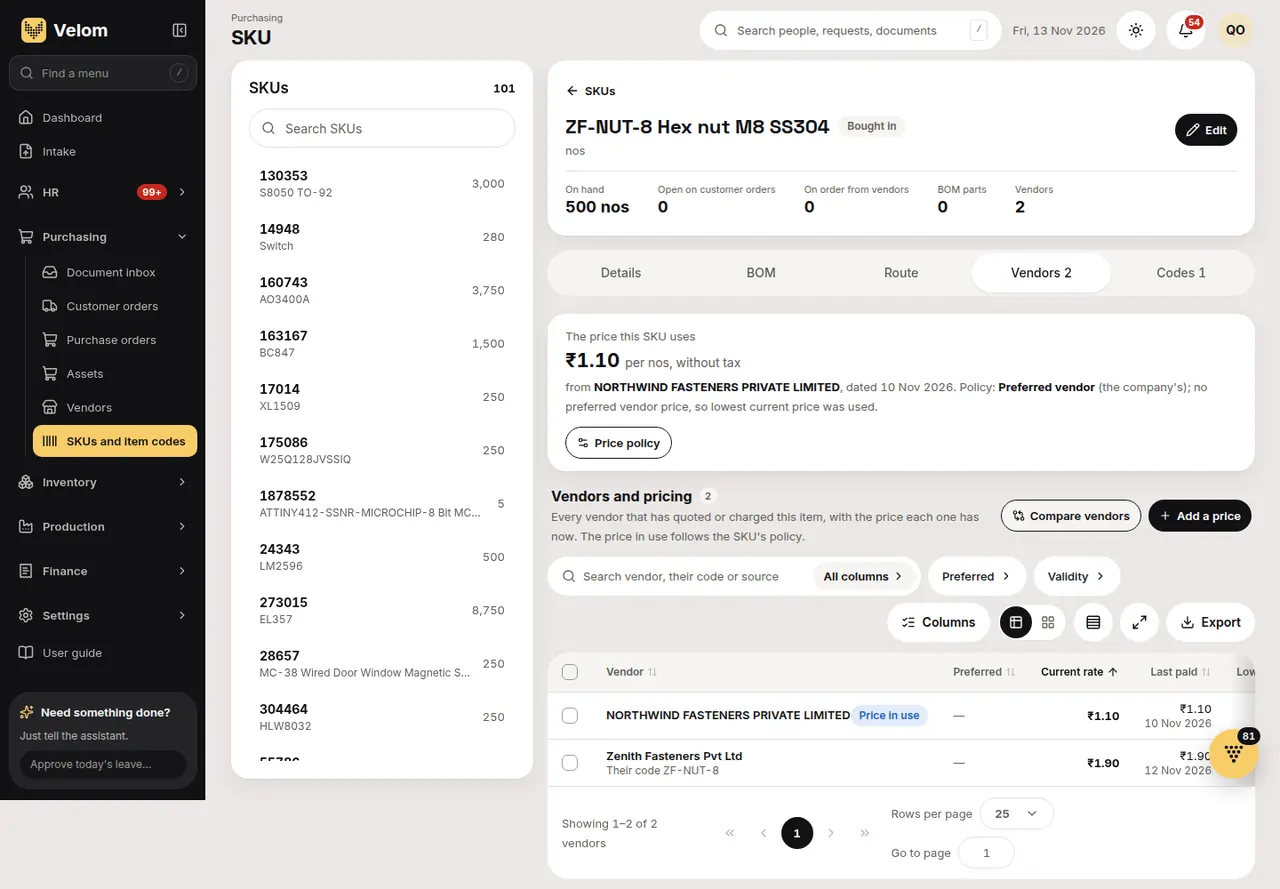
Yes, it improves it. By mapping the correct quantities to your specific SKUs, the system maintains an accurate price history for each individual part. This allows you to perform reliable vendor price comparisons based on actual unit costs rather than broad, inaccurate category pricing.
What happens if the quantities in the split do not match the total?
Velom will flag the discrepancy. The approval process is designed to ensure that the sum of your split lines matches the original vendor line, preventing errors in your inventory ledger and ensuring your financial records remain consistent.
Do I need to manually file the split data with any government portal?
No. Velom does not file data with government portals. The splitting of lines is an internal operational step to manage your own inventory and purchasing records accurately. You remain responsible for filing your GST returns on the official government portal.