Payroll6 min read
Salary Slip Format and Payroll: A Guide for Indian Factories
Moving from manual spreadsheets to a structured payroll system ensures accuracy in salary calculations and statutory compliance.
By Appikorn team ·
In this article
Short answer
How can I improve my salary slip format and payroll accuracy?
To improve payroll accuracy, replace manual spreadsheets with a system that links attendance data directly to salary calculations. This ensures that overtime, leaves, and statutory deductions like PF and ESI are calculated automatically based on verified records, reducing human error and ensuring your salary slips are always compliant and clear.
The problem: a realistic day in an Indian SME factory
In a typical Indian factory, the end of the month brings a familiar sense of anxiety for the HR and payroll staff. The store keeper, production manager, and floor supervisors are busy closing out production targets, but the office staff is buried in a mountain of paper. They are trying to reconcile attendance logs, manual overtime entries, and leave applications. Every month, the payroll person sits with a master spreadsheet, painstakingly copying data from attendance registers that are often incomplete or filled with handwritten notes. If a worker forgets to punch in or out, the entire calculation for the month is thrown into disarray, leading to frantic calls and manual adjustments that are prone to human error.
The situation becomes even more complex when statutory deductions like Provident Fund (PF), Employee State Insurance (ESI), and Professional Tax (PT) come into play. Keeping track of wage ceilings and changing tax slabs across different states requires constant vigilance. The payroll person must ensure that every payroll run adheres to the latest government rules, which they often check via the EPFO official portal or state labour department sites. Because the process is manual, verifying if an employee worked enough days to qualify for specific benefits or if their overtime hours match the production logs is a full-time task that leaves little room for other administrative duties.
What it costs: time, rework, money and risk
The cost of manual payroll management extends far beyond the time spent typing numbers into a spreadsheet. When payroll relies on manual entry, the risk of calculation errors increases significantly. An incorrect deduction or an overlooked overtime hour can lead to employee dissatisfaction and industrial relations issues. When workers find discrepancies in their take-home pay, the HR team spends days resolving complaints, pulling out physical registers, and manually recalculating figures. This rework is not just time-consuming; it diverts attention from essential tasks like recruitment, training, and workplace safety.
Furthermore, there is a significant financial risk associated with non-compliance. Statutory bodies require precise reporting. If your records do not match the actual attendance or salary paid, you may face penalties during audits. The lack of a unified system means that data exists in silos—attendance in one register, salary structures in another, and leave records in a third. When these are not perfectly synced, the factory risks overpaying or underpaying staff, which impacts the bottom line. Over time, this inefficiency creates a culture where payroll is seen as a fire-fighting exercise rather than a structured administrative process, weakening the overall operational discipline of the factory.
How the team did it before: paper, spreadsheets, WhatsApp
Before adopting a digital system, the team relied on a fragmented approach that was held together by sheer effort. Attendance was often tracked using physical punch cards or a shared notebook kept at the factory gate. Supervisors would send daily attendance updates via WhatsApp, which were then transcribed by the payroll person into a massive, multi-tab Excel workbook. This workbook contained complex formulas that were often broken, leading to "circular reference" errors that nobody knew how to fix. Any change to a salary structure meant manually updating rows for every employee, risking accidental deletions or formula errors.
Communication regarding leaves and overtime was equally chaotic. Employees would submit paper slips, which were often misplaced or left on a desk. The payroll person had to manually track these against the attendance register, hoping that no paper went missing. When it came to monthly payouts, the team had to manually generate bank advice files, often cross-referencing names and account numbers that were stored in separate documents. This reliance on paper and disconnected digital files meant that there was no single source of truth. If the payroll person was on leave, the entire process would grind to a halt because nobody else knew how to navigate the complex, unlabelled spreadsheet formulas.
How Velom solves it, step by step
Velom streamlines the payroll process by connecting attendance data directly to the salary engine, ensuring that calculations are based on verified records rather than manual guesses. The platform handles the complexity of statutory rules while maintaining transparency for both the owner and the employees.
- Set Salary Structures: Use templates to define salary components like Basic, HRA, and Special Allowance. Changes are saved as new structures from a specific date, ensuring history is preserved.
- Attendance Integration: The attendance register automatically feeds days, hours, and overtime into the payroll run. No manual copying is required.
- Calculate Payroll: Start a payroll run. The system calculates PF, ESI, and PT based on the rules you have configured, applying statutory wage ceilings automatically.
- Review and Adjust: Use the payroll dashboard to review calculated amounts. Add bonuses, incentives, or arrears as adjustments that require specific approval.
- Approve and Lock: Once the data is verified, approve the run. Locking the run publishes the payslips, which are then available for employees to view and download.
- Generate Reports: Export the payroll register and bank advice file directly from the system for your financial records.
Example scenario
This is an illustrative example, not a real customer. Consider a factory manager preparing the monthly payroll for a team of 50 workers. One week before the end of the month, the manager reviews the attendance register in Velom. They notice three workers have "Needs review" status due to missing check-out times. The manager contacts the supervisors, verifies the actual exit times, and updates the records in the system. Because the payroll engine is already linked to these records, the system instantly updates the estimated earnings for those workers.
On the last day of the month, the manager initiates the payroll run. The system pulls the total present days, including approved overtime hours, and applies the PF and ESI rules for all employees under the wage ceiling. The manager reviews the generated report, notices an incentive payment for a high-performing team, and adds it as an adjustment. After a quick check of the bank advice, the manager approves the run. The system locks the figures, and every employee receives a notification that their payslip is ready to view on their phone. The entire process, which used to take four days of spreadsheet work, is completed in under two hours.
What to check before you start
Before you begin your first digital payroll run, ensure you have all the necessary information ready to avoid delays. Confirm that your salary components—such as Basic, HRA, and allowances—are correctly mapped in your templates. Verify your statutory settings, including the current PF and ESI rates, and confirm these with your accountant to ensure full compliance with the latest regulations. Ensure all employee bank account details and UAN numbers are correctly entered into their profiles.
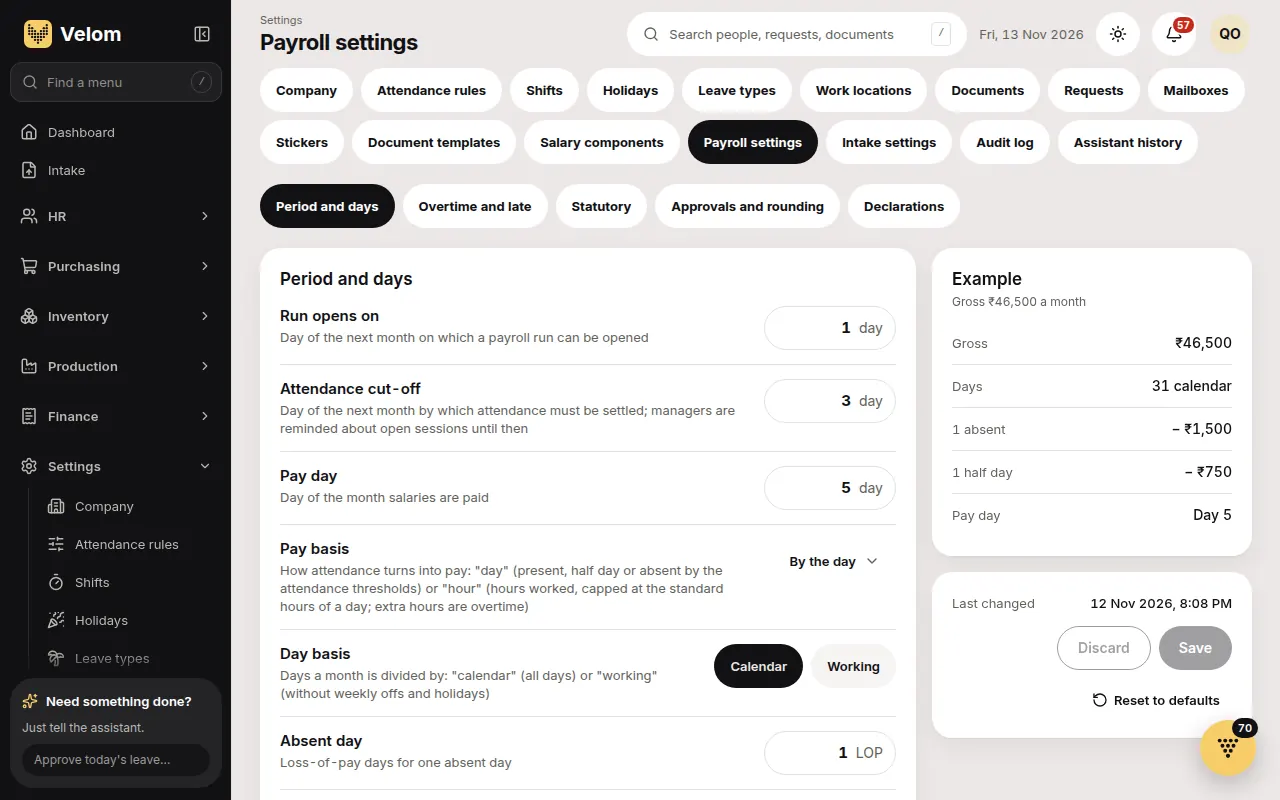
Check that your attendance register is up to date for the month, with all leave requests, overtime, and permission slips approved. If you have any employees who have joined or left during the month, ensure their joining or exit dates are recorded accurately. Finally, make sure you have defined your pay period—whether it follows a calendar-day or working-day basis—so the system calculates the pro-rata salary correctly. Having these details in order allows you to transition to a reliable salary slip format without the usual month-end stress.
The transition to a digital payroll system is a major step toward better factory management. By removing the dependency on manual registers and spreadsheets, you gain accuracy and peace of mind. Start by ensuring your attendance data is clean and your salary structures are clearly defined. With these foundations, the payroll process becomes a predictable, monthly routine that supports your team and keeps your operations running smoothly.
Frequently asked questions
How can I improve my salary slip format and payroll accuracy?
To improve payroll accuracy, replace manual spreadsheets with a system that links attendance data directly to salary calculations. This ensures that overtime, leaves, and statutory deductions like PF and ESI are calculated automatically based on verified records, reducing human error and ensuring your salary slips are always compliant and clear.
Does Velom file my PF or ESI returns with the government?
No, Velom does not file returns or pay challans on government portals. It provides the accurate data and reports you need to perform these filings yourself on the respective government websites.
Can I manage different salary structures for different employees?
Yes, you can create salary structures using templates for different roles or departments. Any change to a structure is saved as a new version from a specific date, ensuring historical data remains intact.
What happens if an employee forgets to check out?
The system marks the day as 'Needs review' instead of guessing the time. A manager must provide the correct time and approve it before the attendance can be used for payroll calculations.